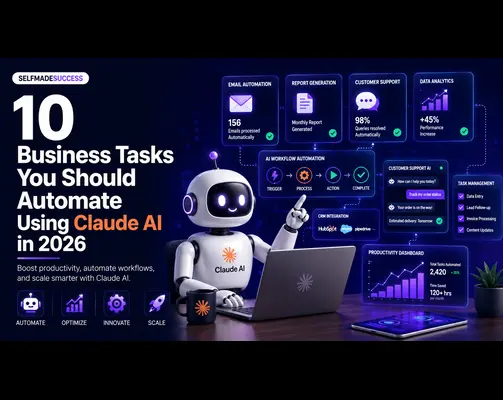
How to Use AI Agents for Lead Generation and Follow-Up Automation

Lead generation is one of the key ways through which any company grows. Businesses spend money on websites, paid ads, SEO, social media, landing pages, email marketing campaigns, and outbound sales in order to generate new leads.

However, lead generation is only the beginning. Generating leads without managing them effectively will not produce strong results for any business.

Many companies miss out on valuable opportunities not because their marketing teams are doing poor work, but because the leads generated through marketing are not managed properly.

A person fills out a form on a website and waits several hours for a response. A potential client requests a quotation, but the sales team misses that request. A lead is generated through LinkedIn or paid ads, but it does not get added to the CRM system. A follow-up email gets delayed or forgotten altogether.

A follow-up email gets delayed or forgotten altogether

This is where AI agents for lead generation and follow-up automation can add real business value.

AI agents are intelligent systems that can understand business objectives, process lead information, make decisions, connect with other tools, and execute multi-step processes with human supervision.

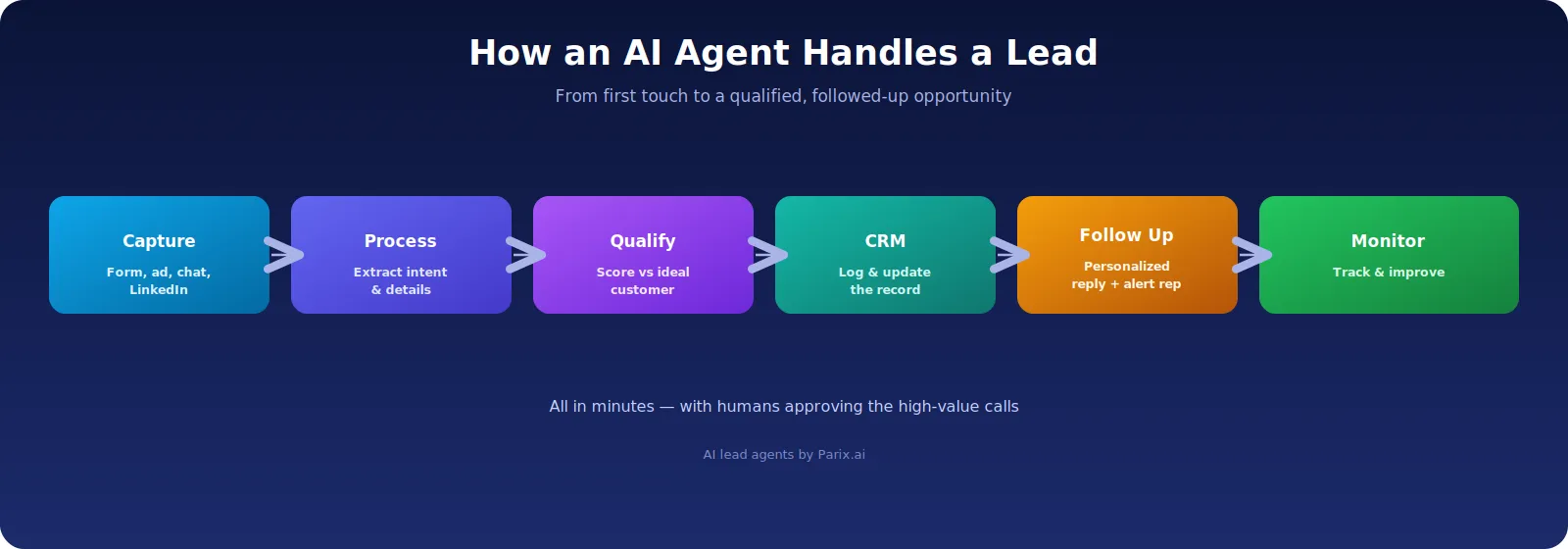
For sales and marketing teams, this means AI agents can do much more than basic automation. An AI agent can capture leads, qualify prospects, enrich contact records, create personalized follow-ups, update CRM fields, generate sales activities, alert the right salesperson, and keep following up with leads until they respond.

According to Salesforce’s State of Sales 2026 research, the use of AI in sales is already becoming common, with many businesses using AI for prospecting, forecasting, lead scoring, and email writing.

What Are AI Agents in Lead Generation?

An AI agent is an artificially intelligent software solution that can perform specific actions based on instructions, information, and application integrations.

In lead generation, an AI agent works like a virtual sales assistant. It helps manage leads from the first touchpoint to the next qualified sales action.

A standard automation may send the same email to every new lead. An AI agent can do much more. It can scan the message, understand the user’s intent, identify the service of interest, compare the lead with the ideal customer profile, assign a score, update the CRM system, draft a response, and alert the sales team.

For example, imagine a visitor submits this message on a company’s website:

We need assistance developing an AI automation system to minimize manual support services. Do you have experience building ticketing solutions?

A normal automation may only send an automatic thank-you email.

An AI agent, however, can understand that the lead is interested in AI-powered customer support automation. It can mark the lead as AI Automation, identify high commercial interest, create a summary for the sales team, add the lead to the CRM, and send a relevant email with a meeting link.

That is what makes AI agent automation different from simple automation.

Simple automation follows fixed rules. AI agents understand context and support more flexible workflows.

Why Is Follow-Up Automation Needed?

In sales, speed matters.

When a potential client contacts a company, their interest is usually strongest at that moment. If the company does not reply at the right time, the lead may contact another company, lose interest, or forget why they reached out in the first place.

Manual follow-up often creates several problems:

  • Sales teams respond slowly because they are busy with meetings, calls, or existing clients.
  • Leads come from multiple channels, making them hard to track.
  • CRM updates are skipped because they require extra manual work.
  • Follow-up reminders are forgotten.
  • Standard emails sound robotic and impersonal.
  • Sales managers may not know which leads are active, qualified, ignored, or lost.

AI-based agents help solve these problems by creating a structured, automated, and intelligent follow-up process.

Instead of waiting for a human to manually check every new lead, an AI agent can process the lead immediately. It can determine how urgent the lead is, decide who should handle it, send a customized response, and start the correct follow-up flow.

However, AI agents should not replace human salespeople. They should support them.

Human sales teams are still important for relationship building, discovery calls, negotiations, trust-building, and final decision-making. AI agents simply make the process faster, cleaner, and more organized.

How AI Agents Work Within a Lead Generation System

A professional AI-based lead generation system is made up of several connected parts. These parts work together to gather leads, analyze data, evaluate lead quality, and engage with prospects.

These parts work together to gather leads, analyze data, evaluate lead quality, and engage with prospects.

1. Lead Generation Point

The first part is the lead generation point. This is where the lead enters the system.

Common lead sources include:

  • Website forms
  • Landing pages
  • Chatbots
  • Paid advertising campaigns
  • LinkedIn messages
  • Email marketing campaigns
  • Webinar sign-ups
  • Booking forms

Each of these sources can bring in potential customers. The problem begins when these leads are not managed in one organized system.

2. Data Processing Layer

The second part is the data processing layer.

This layer analyzes the lead data and extracts useful details such as:

  • Name
  • Email address
  • Phone number
  • Industry
  • Desired service
  • Budget
  • Urgency
  • Message intent

This helps the AI agent understand what the lead wants and how valuable the opportunity may be.

3. Lead Evaluation Layer

The third part is the evaluation layer.

Here, the AI agent evaluates the lead based on predefined criteria or an ideal customer profile.

It may check:

  • Whether the lead is a business owner or decision-maker
  • Whether the company size fits your target market
  • Whether the requested service matches your offer
  • Whether the message shows buying intent
  • Whether the lead has provided enough business details

This step helps separate serious prospects from general inquiries.

4. CRM Integration Layer

The next part is CRM integration.

Once the lead is evaluated, the AI agent transfers the lead information into a CRM tool such as:

  • HubSpot
  • Salesforce
  • Zoho
  • Pipedrive
  • Airtable

The CRM can store the lead’s contact details, lead score, service interest, message summary, follow-up status, and next action.

5. Communication Layer

The communication layer includes tools used to contact the lead or notify the sales team.

This may include:

  • Email
  • SMS
  • WhatsApp
  • Slack
  • Microsoft Teams
  • CRM notifications
  • Internal messaging tools

The AI agent can use this layer to send replies, notify sales representatives, and create follow-up reminders.

6. Monitoring and Optimization Layer

The final part is the monitoring and optimization layer.

Businesses need to track important metrics such as:

  • Response time
  • Number of qualified leads
  • Calls booked
  • Follow-ups completed
  • Conversion rate
  • Revenue generated from AI-driven processes

These metrics help businesses improve the workflow over time.

Enterprise-level AI agent solutions also require security, governance, lifecycle management, and observability. This is especially important in lead generation because AI agents may interact with customer data, CRM records, and communication tools.

Key Uses of AI Agents for Lead Generation

1. Capturing Inbound Leads From Website Forms

Website form submissions are one of the easiest ways to generate inbound leads. However, many companies treat all form submissions the same way.

This is not always effective.

A person asking for a custom AI automation system should not be treated the same as someone making a very general inquiry.

For example, a prospect who says:

We require a custom AI automation solution for our e-commerce customer service team.

is clearly more valuable than someone who says:

Just asking about your products.

An AI agent can assess each website form submission in real time. It can identify whether the lead is asking about pricing, consultation, service comparison, technical assistance, or general information.

A high-value lead can be prioritized immediately, while a low-priority lead can receive a more general nurturing response.

2. Qualifying Inbound Leads

Lead qualification helps businesses prioritize their best opportunities.

Without a proper qualification process, sales teams may waste time on low-quality leads while serious prospects wait too long for a response.

An AI agent can qualify leads based on several factors, including:

  • Service interest
  • Company size
  • Job title
  • Industry
  • Budget
  • Location
  • Urgency
  • Quality of communication
  • Buying intent

The AI agent can also compare the lead with your existing customer profile to determine whether the lead is a strong match.

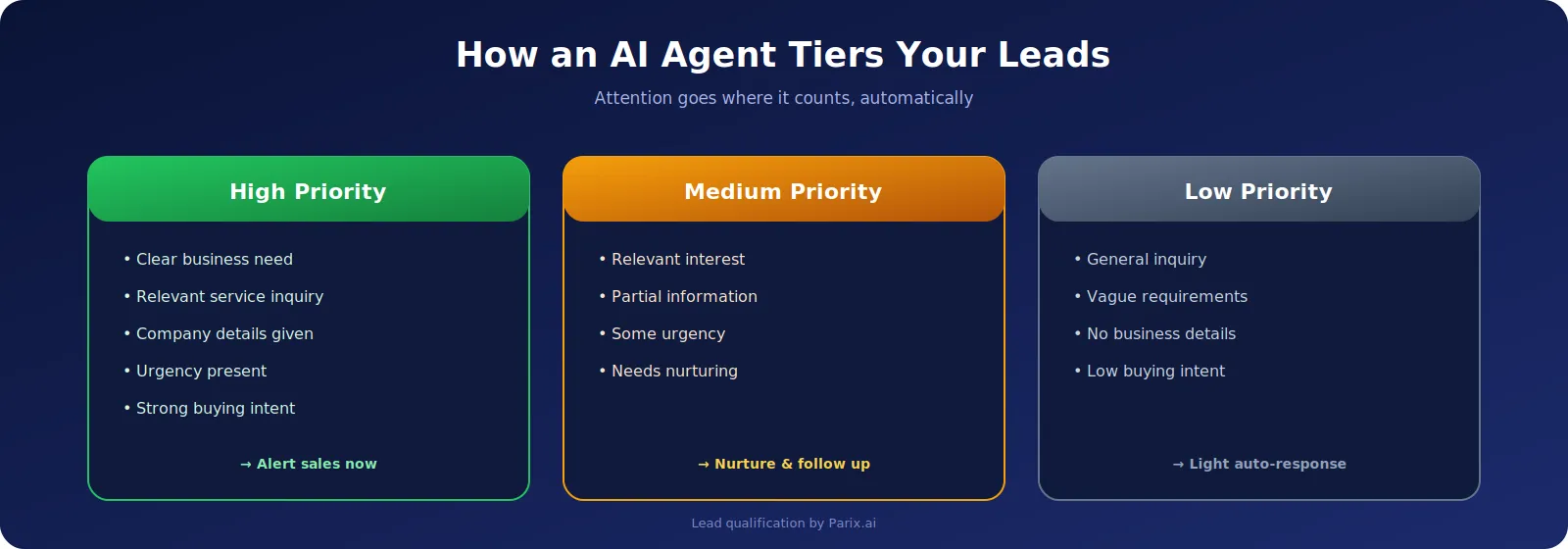
Lead Qualification Categories

High-Priority Lead

A high-priority lead usually has:

  • A clear business need
  • A relevant service inquiry
  • Company details
  • Urgency
  • Strong buying intent

Medium-Priority Lead

A medium-priority lead usually has:

  • Relevant interest
  • Partial information
  • Some urgency
  • Need for further nurturing

Low-Priority Lead

A low-priority lead usually has:

  • A general inquiry
  • Vague requirements
  • No business details
  • Low buying intent

These categories help sales teams focus more on qualified leads instead of spending too much time on unqualified prospects.

3. CRM Data Entry and Enrichment

A CRM is a very useful tool for managing business contacts and sales opportunities. However, it only works well when the data is clean and updated.

Sales representatives often struggle with CRM maintenance because manual updates take time.

An AI sales agent can automatically enter important data into the CRM, including:

  • Contact information
  • Company details
  • Lead source
  • Service interest
  • Tags
  • Notes
  • Conversation summary
  • Recommended next action

An AI agent can also enrich CRM records by collecting publicly available company information or asking the lead for missing details through follow-up messages.

For example, if a lead only provides an email address and a short message, the AI agent can ask for:

  • Company name
  • Website
  • Project timeline
  • Budget range
  • Preferred meeting time

Maintaining clean CRM data is important for sales forecasting, reporting, performance analysis, and better decision-making.

4. Personalized Follow-Up Emails

Personalized emails are more effective than generic messages.

When a lead asks about AI integration services, the follow-up should mention AI integration, workflow automation, system connectivity, and next steps.

When another lead asks about SaaS product development, the follow-up should focus on product planning, software development, scalability, and technical consultation.

A personalized AI-generated email may include:

  • Prospect name
  • Service requested
  • Short summary of the prospect’s need
  • Relevant solution
  • Booking link
  • Clear next action

The goal is not to make the message long. The goal is to make it specific, personal, and easy to respond to.

Example Follow-Up Email

Hi [Prospect Name],

Thank you for asking about [Service]. Based on your message, it looks like you need help with [brief summary of need].

We can help you solve this with [relevant solution]. Would you like to discuss this in more detail? You can book a quick meeting here: [Booking Link].

Best regards,
[Your Name]

AI agents can also create different follow-up strategies depending on the lead type.

A highly interested lead may receive a meeting request immediately. A research-stage lead may receive educational material such as a guide, case study, or service explanation. A cold lead may enter a longer nurturing process.

5. Alerts for the Sales Team

Lead response becomes faster when the right person receives the right notification at the right time.

An AI agent can notify team members through:

  • Email
  • Slack
  • Microsoft Teams
  • CRM notifications
  • Project management software

The alert can include:

  • Brief lead description
  • Qualification score
  • Suggested action
  • Direct CRM link

Example Sales Notification

A new high-priority lead has been generated.

Business type: E-commerce company
Requirement: Customer support automation
Need: Ticket management and automated responses
Suggested action: Respond within 15 minutes and schedule a discovery call.

This type of notification saves time because the salesperson does not need to read the full form manually to understand the opportunity.

6. Automated Follow-Up Sequence

Not every lead becomes a client after one message.

Some leads need reminders, additional information, trust-building content, and scheduled calls before they make a decision.

AI agents can manage follow-up sequences based on the lead’s actions.

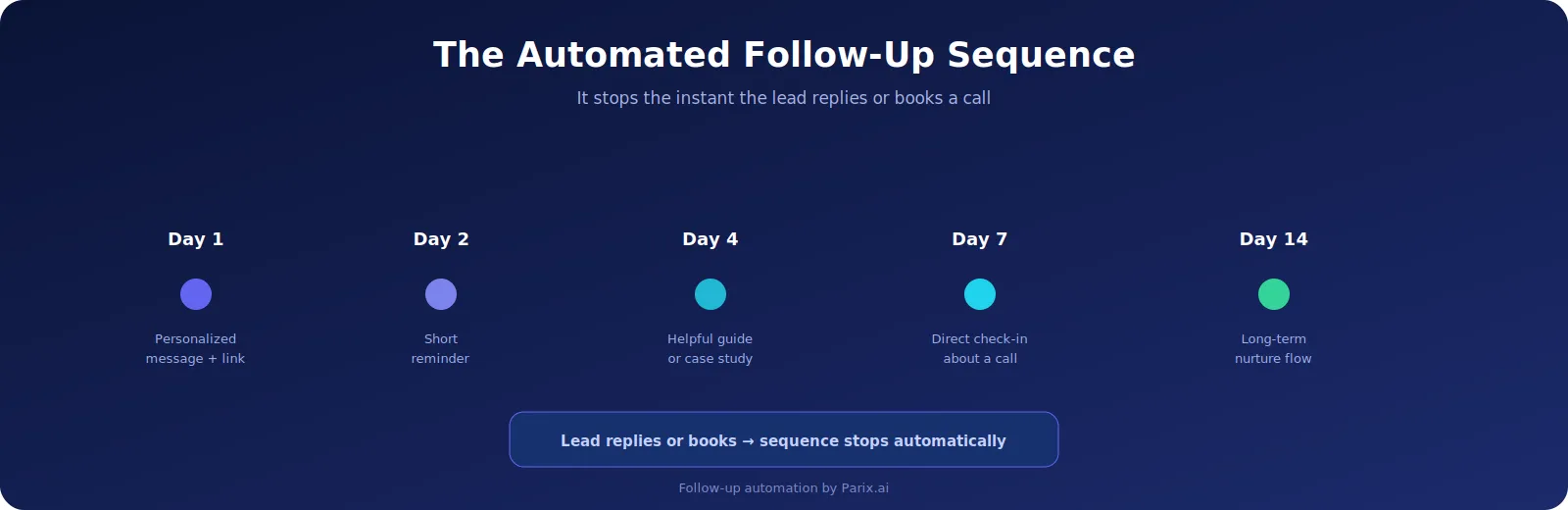
Example Follow-Up Sequence

  • Day 1: Send a personalized message with a booking link.
  • Day 2: If there is no response, send a short reminder.
  • Day 4: Share more information about your service or a relevant article.
  • Day 7: Ask if they still want to book an appointment.
  • Day 14: Move the lead into a long-term nurturing sequence.

The AI agent can automatically stop the follow-up sequence once the lead replies, books a call, or declines interest.

This keeps the process professional and avoids unnecessary repeated messages.

7. Lead Routing

In larger teams, leads may need to be distributed among different employees based on service category, region, deal size, or industry.

AI agents can route leads automatically.

For example:

  • AI automation leads can go to an AI consultant.
  • SaaS development leads can go to a product strategist.
  • Enterprise leads can go to a senior sales representative.
  • Small business leads can go to an inside sales team.

This makes the process more accurate and reduces confusion inside the organization.

8. Re-Engagement of Cold Leads

Cold leads are prospects that already exist in the CRM but are no longer active.

They may become cold because of poor follow-up, wrong timing, or lack of communication.

AI agents can help re-engage cold leads by analyzing old conversations and creating personalized re-engagement messages.

Example Cold Lead Re-Engagement Message

Hi Sarah,

You contacted us earlier regarding customer support workflow automation. Recently, we helped companies create AI-powered solutions to manage tickets faster and update CRMs automatically.

Would you like to continue our conversation?

This type of message works better than a generic promotional email because it refers to the lead’s previous interest.

Technical Architecture of an AI Lead Generation Agent

An AI lead generation agent should not be built like a random chatbot. It should be designed as a structured workflow system.

A strong AI lead generation architecture may include the following layers.

1. Input Layer

The input layer gathers lead data from different sources.

These sources may include:

  • Web forms
  • Landing pages
  • Chat widgets
  • Ad platforms
  • Emails
  • LinkedIn forms
  • Calendar applications
  • CRM imports

Whenever possible, every source should provide structured data.

Important fields include:

  • Name
  • Email
  • Phone number
  • Company name
  • Message
  • Lead source
  • Campaign name
  • Landing page
  • Date and time

2. AI Processing Layer

The AI processing layer analyzes the lead message using a language model.

This layer performs tasks such as:

  • Extracting key information
  • Summarizing the lead request
  • Identifying intent
  • Detecting urgency
  • Recommending the next action

These operations can be performed using prompt instructions, classification rules, business knowledge, and structured formats such as JSON.

Example AI Output:

Lead intent: AI automation inquiry
Service interest: Customer support automation
Priority: High
Recommended action: Send consultation email and alert sales
Suggested tag: AI Automation
Follow-up sequence: High-priority inbound lead

3. Business Rules Layer

AI should not make every decision on its own.

The business rules layer defines what the agent is allowed to do and what needs human approval.

For example:

  • If the lead score is high, alert sales instantly.
  • If the lead asks about pricing, offer a booking link for consultation.
  • If the lead is outside the service area, respond politely.
  • If the lead includes confidential data, ask a human for approval.
  • If the AI confidence score is low, avoid sending an automatic email.

This layer makes the system safer, more reliable, and more predictable.

4. Integration Layer

The integration layer connects the AI agent with external applications.

These applications may include:

  • CRM platforms
  • Email tools
  • Spreadsheets
  • Project management software
  • Analytics dashboards
  • Communication tools

For lead generation, the AI agent should be able to:

  • Create CRM contacts
  • Update deal stages
  • Send emails
  • Create tasks
  • Set reminders
  • Notify teammates

When integrated properly, an AI agent becomes more than a text generator. It becomes a practical workflow automation system.

5. Human Review Layer

Human review is important for quality control.

Not every message should be sent automatically, especially when the lead is high-value or the request is complex.

A strong system can include multiple approval levels:

  • Low-risk messages can be sent automatically.
  • Medium-risk messages can be drafted for review.
  • High-value leads can be assigned directly to human salespeople.

This approach helps businesses move faster without losing control.

6. Analytics Layer

The analytics layer tracks performance.

Without analytics, businesses cannot know whether the AI agent is improving results.

Important performance indicators include:

  • Response time
  • Lead qualification accuracy
  • Number of leads processed
  • Number of follow-up emails sent
  • Meetings scheduled
  • Reply rate
  • Conversion rate
  • Sales cycle length
  • CRM updates completed
  • Revenue generated by AI workflows

Analytics help businesses improve prompts, messages, rules, workflows, and sales copy.

Tools to Use for AI Lead Generation and Follow-Up Automation

There are several tools companies can use to implement AI lead generation and follow-up workflows.

There are several tools companies can use to implement AI lead generation and follow-up workflows.

AI Models

  • ChatGPT
  • Claude
  • Gemini
  • Other large language models

Workflow Automation Tools

These tools help connect forms, CRMs, emails, spreadsheets, and communication apps.

CRM Tools

  • HubSpot
  • Salesforce
  • Zoho
  • Pipedrive
  • Airtable

Communication Tools

  • Gmail
  • Outlook
  • Slack
  • Microsoft Teams
  • WhatsApp Business
  • Calendly

The best tool stack depends on the company’s size and workflow.

Small companies may only need a website form, Google Sheets or HubSpot, an AI model, and email automation.

Larger companies may need a more advanced system with CRM workflows, lead scoring, approval rules, analytics dashboards, and team notifications.

Steps for Building an AI Lead Follow-Up Process

The best way to start is to build one simple workflow first.

Step 1: Select One Lead Source

Start with one source, such as your website contact form.

Step 2: Define Lead Qualification Criteria

Set clear rules for:

  • High-priority leads
  • Medium-priority leads
  • Low-priority leads

Step 3: Create the AI Prompt

The prompt should tell the AI agent how to:

  • Extract lead information
  • Classify intent
  • Assign priority
  • Summarize the request
  • Suggest the next action

Step 4: Connect Your CRM

The workflow should automatically create or update a lead record in your CRM.

Step 5: Create Email Templates

Prepare email templates that the AI agent can personalize based on the lead’s inquiry.

Step 6: Add Internal Notifications

The sales team should receive alerts when a qualified lead comes in.

Step 7: Build the Follow-Up Sequence

Create follow-up actions for different time gaps, such as:

  • 1 day
  • 3 days
  • 7 days
  • 14 days

Step 8: Add Human Approval

High-value leads should be reviewed before automated communication is sent.

Step 9: Measure and Improve

Track your results and improve the workflow based on real performance data.

Mistakes to Avoid With AI Lead Generation Automation

AI lead generation automation can fail when businesses implement it without proper planning.

Mistake 1: Automating Without a Clear Sales Funnel

If your current follow-up process is unclear, AI automation will only speed up the confusion.

Before using AI, define your lead stages, qualification rules, and response process.

Mistake 2: Sending Generic AI Emails

AI should not make your communication more robotic.

The goal is to make every follow-up more personalized, relevant, and helpful.

Mistake 3: Giving AI Full Control Too Early

Businesses should start with AI-assisted workflows.

For example, the AI agent can draft the message, but a human can approve it before sending.

Mistake 4: Using Poor CRM Data

If your CRM data is outdated, incomplete, or duplicated, the AI agent may make poor decisions.

Clean CRM data is essential for strong AI workflows.

Mistake 5: Not Monitoring Performance

AI workflows should be reviewed regularly.

Monitor reply rates, booking rates, conversion rates, and lead quality to understand what is working.

AI Lead Automation Best Practices for Professionals

Start with a specific business objective. For example, reduce lead response time, increase booked calls, improve CRM accuracy, or recover cold leads.

Use structured data wherever possible. Forms should collect useful information such as required service, budget, company size, and project timeline.

Keep humans involved in critical decisions. AI can support the process, but important sales conversations still require human judgment.

Develop strong prompts and guidelines. The AI agent should understand your services, tone, lead categories, and escalation rules.

Integrate AI with your CRM. AI lead automation becomes much more powerful when it can update your sales pipeline automatically.

Review performance regularly. Track reply rates, booking rates, conversion rates, and lead quality.

Protect customer data. An AI agent should only access the information it needs, and your business should use secure tools with proper permissions.

Advantages of Using AI Agents in Lead Generation

AI agents can provide several major advantages for businesses.

Faster Response Time

Leads can be followed up instantly, even outside normal working hours.

Better Lead Qualification

AI agents help identify prospects who show real buying intent.

Personalized Messages

Each message can be written according to the specific needs of the lead.

Less Manual CRM Entry

Lead information can be recorded automatically.

Consistent Follow-Ups

Every lead can receive the right follow-up at the right time.

Better Sales Productivity

Sales representatives can spend more time on conversations and less time on repetitive admin tasks.

Improved Growth Opportunities

When leads are handled quickly and professionally, businesses have a better chance of converting them into paying customers.

AI Agent Workflow Example for a Service Business

Here is an example of how an AI agent workflow can work for a service company.

A lead fills out a form on a website asking for AI automation.

The AI agent reads the form and identifies the service category, business issue, urgency, and contact information.

The lead is prioritized because the message includes a specific business problem.

The lead source, service interest, lead score, and conversation summary are added to the CRM.

A personalized email is created:

Hello, thank you for getting in touch. Based on your message, I believe your team is interested in automating repetitive customer support tasks and improving response time.

We can help create a custom AI workflow that integrates your support inbox, CRM, and team notifications. You can book a quick discovery call here: [Booking Link].

The sales team receives a notification with a brief summary of the lead.

If there is no response within two days, the AI agent sends another short message.

When the lead books a call, the follow-up sequence stops and the CRM stage is updated.

This is a simple and practical workflow that can bring measurable results.

How to Use AI Agents for Lead Generation & Follow-Up Automation

AI Agents in the Future of Sales Automation

AI agents will continue to play a major role in sales and marketing automation.

Modern companies are moving from manual lead management to smarter sales strategies powered by AI, CRM data, automation software, and professional sales expertise.

The future is not about replacing salespeople. It is about giving sales teams better tools.

AI agents can handle routine work, organize data, and speed up the process. Human teams can focus on trust, strategy, negotiation, personalization, and closing deals.

Organizations that introduce AI sales lead generation automation early may gain a strong competitive advantage.

Conclusion

AI agents for lead generation and follow-up automation are becoming essential for companies that want efficient growth.

Lead generation alone is not enough anymore. Businesses need a strong lead management system for collecting leads, qualifying them, updating the CRM, sending personalized follow-ups, and making sure every lead receives attention.

AI agents make these operations faster and more efficient.

They can read lead messages, qualify prospects, assign lead scores, create CRM records, draft personalized emails, alert the sales team, and manage follow-up sequences.

When implemented correctly, AI agents can help businesses prevent lead loss and improve sales productivity.

The best strategy is to start small. Begin with one lead source, such as your website form. Use AI for lead qualification, CRM updates, personalized email drafts, and sales team alerts. Then gradually improve your workflow through analysis.

If your business is losing leads because of slow responses, manual CRM updates, or inconsistent follow-up, AI agents can help create a more efficient lead generation and follow-up system.

FAQs

What are AI agents for lead generation?

AI agents for lead generation are intelligent software tools that help companies collect, qualify, organize, and follow up with leads. These tools can analyze lead data, update CRM records, compose customized messages, and alert salespeople.

How do AI agents enhance follow-up automation?

AI agents enhance follow-up automation by sending timely and personalized messages based on a lead’s interest, behavior, and position in the sales funnel. They can also pause or change follow-up strategies when the lead replies or books a meeting.

Can AI agents substitute sales teams?

AI agents cannot fully replace sales teams. They are best used to reduce routine tasks, respond to leads faster, and support human employees in their work.

What tools do you need to create an AI lead generation workflow?

Common tools include AI models, CRM platforms, workflow automation tools, email service providers, website forms, and internal communication platforms. Examples include ChatGPT, Claude, Gemini, HubSpot, Salesforce, Zapier, Make, n8n, Gmail, Slack, and Calendly.

Is AI lead generation automation appropriate for small businesses?

Yes. Small businesses can use simple workflows like website form automation, CRM updates, email responses, and appointment scheduling. They do not need a complex enterprise system to benefit from AI agents.

Which AI agent automation should be used first to generate leads?

The recommended first workflow is website lead follow-up automation. It is easy to measure, directly connected to sales growth, and helps businesses respond faster to interested prospects.

Related articles

Mobile App Development Services for Modern Businesses: Build Scalable iOS and Android Apps

Mobile App Development Services for Modern Businesses: Build Scalable iOS and Android Apps

Best AI Customer Insights Platforms for E-commerce (2026) with n8n & Zapier

Best AI Customer Insights Platforms for E-commerce (2026) with n8n & Zapier

AI Search Optimization: How Businesses Get Found in ChatGPT, Gemini & Google AI

AI Search Optimization: How Businesses Get Found in ChatGPT, Gemini & Google AI