Arcurie — teaching a computer to read a floor plan
Extracting measurements from architectural drawings by hand is slow and the errors compound. Arcurie automates it: object-detection models trained to recognize walls, scale markers, and floor elements inside technical PDFs, calculating real measurements without a person involved. Built and proven as a working proof of concept — the question it set out to answer is answered.
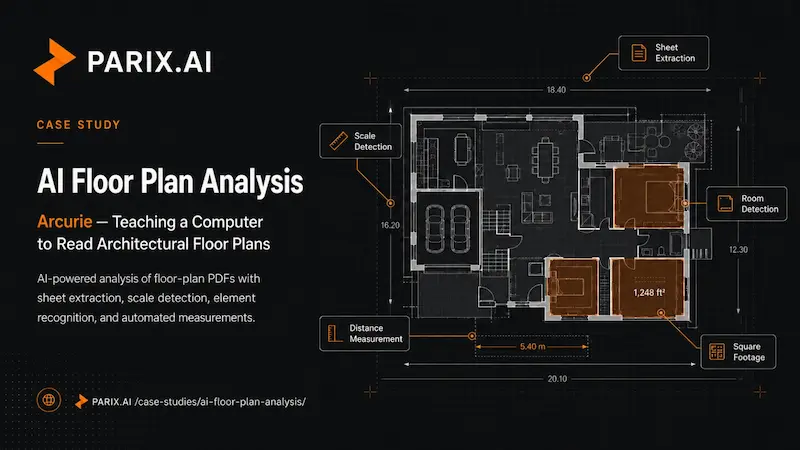
Anyone who has worked with architectural drawings knows the quiet tax they impose. A floor plan holds a huge amount of precise information, but pulling that information out is slow, manual work. Someone has to find the right sheet in a thick PDF, work out the drawing’s scale, measure distances by hand, and add up square footage one room at a time. It is exacting, repetitive, and easy to get slightly wrong, and a small error in a measurement can ripple into a costly mistake down the line.
Arcurie was built to hand that work to a computer. It is an AI-powered architecture analysis platform that takes CAD and architectural floor-plan PDFs and makes sense of them automatically, extracting the sheets, working out the scale, detecting the architectural elements, and calculating measurements like distances and square footage on its own. This is the story of the engineering behind it, where the contribution was as a full-stack developer, building both the React interface people use and the Python AI workflows doing the heavy lifting underneath.
The Problem With Reading Drawings by Hand
Architectural PDFs are made for human eyes, not for machines. A single document might hold dozens of sheets at different scales, dense with lines, symbols, and annotations that mean something specific to a trained professional and nothing at all to a computer. Getting useful numbers out of them has traditionally meant a person sitting down with the drawing and doing the measurement work manually.
That approach has two problems. It is slow, eating up hours of skilled time on a task that is more tedious than it is creative. And it is fragile, because manual measurement invites small inconsistencies, and the more drawings you process, the more those little errors add up. Arcurie set out to solve both at once, turning a slow, error-prone manual process into a fast, consistent, automated one, without losing the precision the work demands.
What Arcurie Actually Does
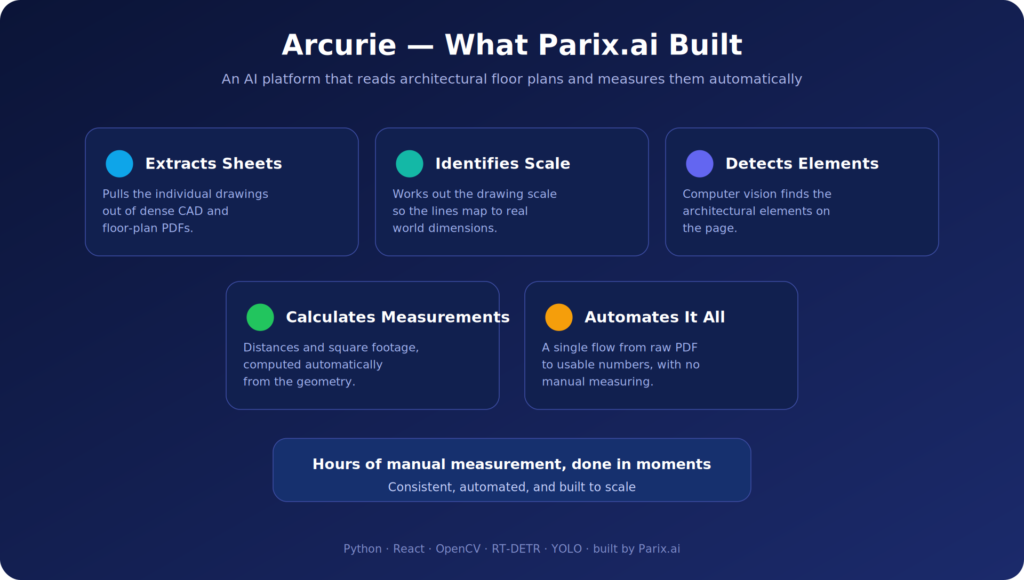
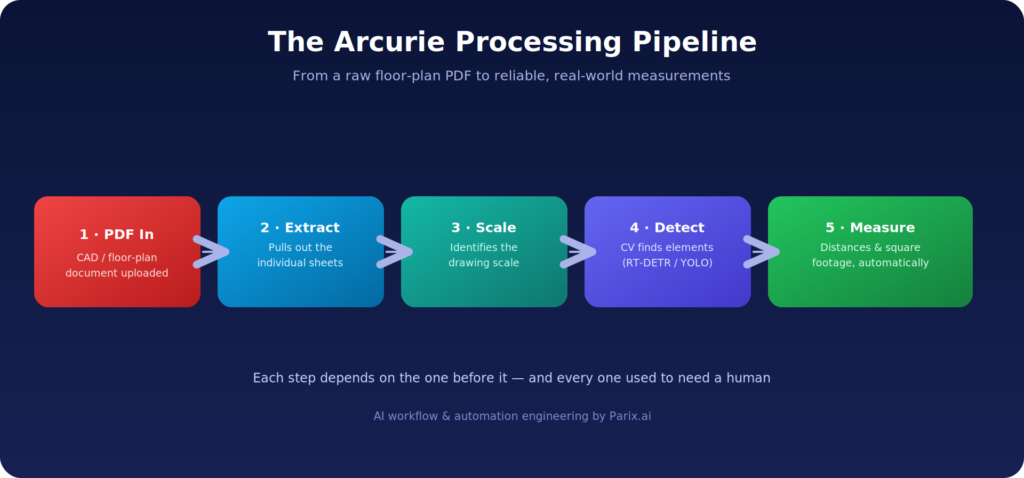
At a high level, Arcurie takes a floor-plan PDF in and gives structured measurements out, but a lot has to happen in between. The platform works through a sequence of steps, each one solving a genuinely hard problem on its own. It extracts the individual sheets from a document, identifies the drawing scale so it knows what the lines actually represent in the real world, detects the architectural elements on the page, and then calculates the measurements that follow from all of that, distances and square footage among them.
That chain is the whole product. Each link depends on the one before it, and every one of them is the kind of task that used to require a human. Stringing them together into a single automated flow, so a raw PDF becomes reliable numbers without a person in the middle, is what makes Arcurie more than a viewer or a converter. It is an AI system that genuinely understands what it is looking at.
Where the Development Work Fit In
A platform like this spans two very different worlds. There is the AI and computer-vision work happening on the backend, and there is the interface a person uses to upload a drawing and see the results. The contribution here reached across both, building frontend features in React and the backend AI workflows in Python, which meant working on the parts users touch and the intelligence they rarely see.
That full-stack span matters on an AI product more than most. The interface has to make a complicated process feel approachable, and the backend has to do something genuinely sophisticated and return it in a form the frontend can present clearly. Working across both sides keeps the two in step, so the clever computer vision actually reaches the user as something simple and useful rather than getting lost in translation between teams.
The Computer Vision Doing the Seeing
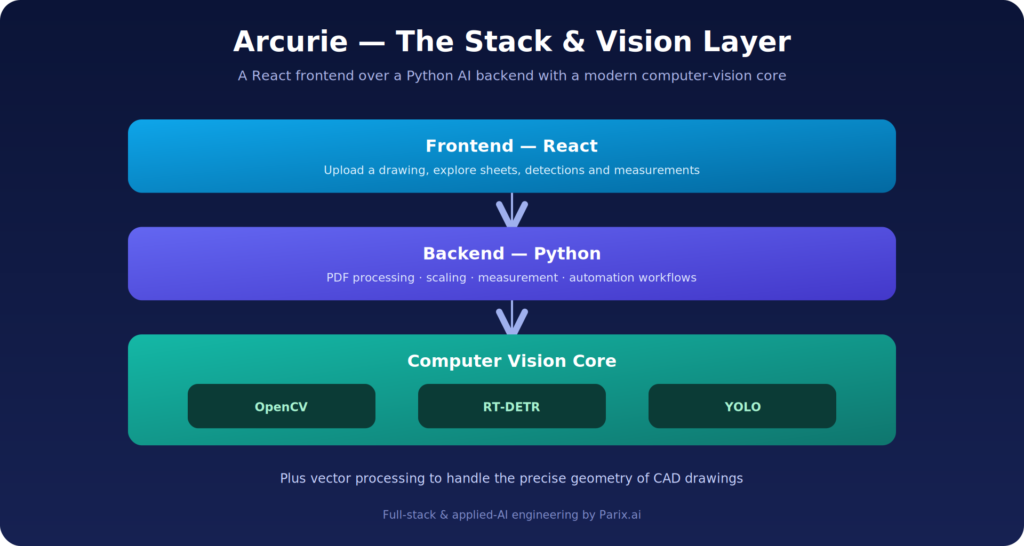
The heart of Arcurie is its ability to look at a drawing and recognize what is on it, and that comes from integrating computer vision models for object detection. The platform draws on OpenCV, a foundational computer-vision toolkit, alongside modern detection models including RT-DETR and YOLO. These are the components that let the system find and identify architectural elements on a page rather than seeing it as a meaningless tangle of lines.
It is worth being clear about how capable these models are. YOLO and RT-DETR are state-of-the-art object-detection systems, the same family of technology used to spot objects in photos and video, here pointed at the specific challenge of architectural drawings. Getting them to perform well on floor plans, which look nothing like the everyday photos these models are often trained on, is a real piece of engineering. Integrating them into a working automated workflow, rather than running them in isolation, is what turns cutting-edge research into something that actually does a job.
From Pixels to Real-World Measurements
Detecting elements is only half the battle. A drawing is just an image until the system knows how big things really are, and that is where scale detection and measurement come in. A core part of the work was on PDF processing, scaling, measurement, and the automation tying it together, the steps that turn what the system sees into numbers a professional can actually use.
This is genuinely tricky. A floor plan is drawn to a scale, and unless the system correctly identifies that scale, every measurement it produces is meaningless. Once the scale is locked in, the platform can translate the geometry on the page into real-world distances and square footage. Handling the PDF processing reliably across different documents, getting the scaling right, and then automating the measurement so it happens without manual input is a demanding sequence of problems, and it is exactly the sequence that makes the platform valuable.
The Interface That Makes It Usable
All of that backend sophistication is wasted if a person cannot easily put a drawing in and get results out. The React frontend is where the complexity gets hidden behind something approachable. Building those frontend features meant creating the place where someone interacts with all this heavy machinery without needing to understand any of it.
The goal of the interface is to make a genuinely complex system feel simple. A user should be able to bring in a floor-plan PDF and see the sheets, detections, and measurements come back in a way that makes sense at a glance. When an AI tool is this powerful under the hood, the interface is what decides whether people can actually benefit from it, and the frontend work is what carries the platform’s intelligence the last step to the person using it.
The Stack Underneath
Arcurie is built on a stack chosen to match the problem. Python powers the backend, which is no accident, it is the natural home of computer vision and machine learning, with the richest ecosystem of tools for exactly this kind of work. OpenCV handles core vision tasks, while RT-DETR and YOLO provide the modern object detection, and vector processing helps make sense of the precise geometry that CAD and architectural drawings are built from.
On the front end, React provides a responsive, modern interface for uploading drawings and exploring results. The combination is a sensible split: a powerful, AI-heavy Python backend doing the analysis, and a clean React frontend making it usable. It is the same blend of full-stack engineering and applied AI behind our other AI product work, including Brain AI and Seotly.
A Proof of Concept With Real Ambition
Arcurie is a proof-of-concept platform, and that framing is honest and important. A proof of concept is where a hard, ambitious idea gets tested in the real world, where you find out whether teaching a computer to read architectural drawings and measure them automatically can actually be made to work. The fact that the platform extracts sheets, detects elements, identifies scale, and produces measurements is the answer: yes, it can.
Proving out something this technically demanding is valuable in itself. It takes the riskiest, least certain part of an idea, the question of whether the core technology works at all, and turns it into something demonstrable. From a working proof of concept, the path to a fuller product becomes far clearer, because the hardest question has already been answered.
Why It Matters
Arcurie sits at the genuinely hard end of AI work. Plenty of products wire a model to a chat box, but applying computer vision to specialized, technical documents like architectural drawings, and getting reliable real-world measurements out of them, is a much steeper challenge. It demands real computer-vision skill, careful PDF and geometry handling, and the full-stack ability to turn all of it into something a person can actually use.
For any business sitting on a pile of technical documents and wondering whether AI could read them, Arcurie is a clear signal of what is possible. The same approach, computer vision plus thoughtful automation plus a usable interface, can be pointed at all sorts of specialized analysis problems. If that sounds like something you are facing, it is an easy conversation to start. Get in touch with Parix.ai here, and the proof of concept shows the idea already works.
Before and After
Before
- Someone had to find the right sheet inside a thick PDF
- Work out the drawing’s scale by hand
- Measure distances manually and add up square footage one room at a time
- Small measurement errors compounded quietly across a set of drawings, and a small error can become a costly mistake later
After
- Sheets are extracted from the document automatically
- The drawing scale is identified by the system, so measurements mean something
- Architectural elements are detected using OpenCV with RT-DETR and YOLO
- Distances and square footage are calculated without a person in the middle
The Outcome
Arcurie is a proof of concept, and it answered the question it was built to answer: a computer can read architectural floor plans, identify scale, detect elements and produce reliable measurements on its own.
That is worth more than it sounds. A proof of concept takes the riskiest, least certain part of an ambitious idea — whether the core technology works at all — and turns it into something demonstrable. From here, the path to a full product is clear, because the hardest question is settled.
Getting object-detection models to perform on floor plans is a real piece of engineering. RT-DETR and YOLO are usually trained on everyday photographs, which look nothing like a CAD drawing. Pointing them at technical drawings and getting dependable real-world measurements out is a much steeper problem than wiring a model to a chat box.
Ready to streamline your operations?
Parix.ai helps growing businesses identify repetitive tasks, improve workflow visibility, and build smarter systems that save time as the business scales.
Talk to Parix.ai