AI image generation has grown up. What started as a novelty is now a real part of how businesses make marketing visuals, social graphics, banners, mockups, and ads, often in minutes instead of days. Two names sit at the front of the pack in 2026: OpenAI’s GPT Image 2 and Google’s Nano Banana. Both are excellent, and they’re built around different strengths.
This guide compares them from a business point of view, what each is genuinely good at, where they differ, and how to decide. The short version: it’s less about which tool “wins” and more about which fits the job in front of you, and how you wire it into the rest of your content process.
Meet the Two Tools
GPT Image 2 (OpenAI)
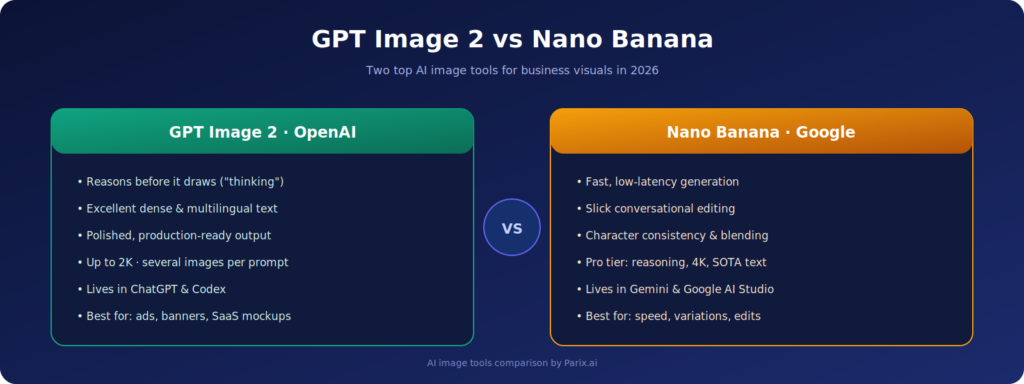
GPT Image 2 is OpenAI’s image model, launched in April 2026 as part of “ChatGPT Images 2.0.” Its headline feature is that it actually reasons before it draws, OpenAI calls it a “visual thought partner,” and it can plan a complex image, check its own output, and produce several coherent variations from a single prompt.
For business work, the practical wins are clarity and control: it renders dense, accurate text, handles multiple languages, follows detailed instructions closely, and outputs at up to 2K resolution. As TechCrunch reported at launch, it’s notably strong at the things that usually break image models, small text, icons, UI elements, and dense compositions, which is exactly what ads, banners, and dashboards need.
Nano Banana (Google)
“Nano Banana” is the popular nickname for Google’s Gemini image models. The original, Gemini 2.5 Flash Image, made its name on speed: fast, low-latency generation, slick conversational editing, reliable character consistency, and easy blending of multiple images. Per Google’s own documentation, that Flash model is tuned for high-volume, quick-turnaround work.
It’s worth knowing the family has grown, because the old “Nano Banana is just fast, not polished” idea is now outdated. Google’s higher-end Nano Banana Pro (Gemini 3 Pro Image) added reasoning, state-of-the-art text rendering, real-world grounding via Google Search, and up to 4K output, and as VentureBeat noted, the two camps now compete directly on quality, not just speed.
Head-to-Head: How They Compare
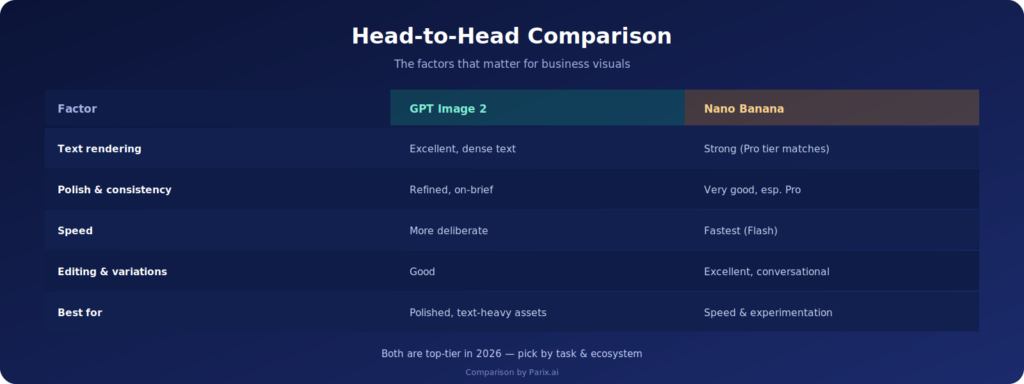
Here’s how the two stack up across the things businesses actually care about.
Text rendering: both are now strong, GPT Image 2 is excellent on dense, structured text; Nano Banana Pro matches it closely, while the Flash tier is good for shorter labels.
Polish & consistency: GPT Image 2 leans toward refined, production-ready, on-brief output thanks to its reasoning step.
Speed: Nano Banana’s Flash model is the quickest for rapid, high-volume generation; GPT Image 2’s thinking mode is more deliberate.
Editing & experimentation: Nano Banana shines at conversational edits, variations, and blending references.
Ecosystem: GPT Image 2 lives in ChatGPT and Codex; Nano Banana lives in the Gemini app, Google AI Studio, and Google Ads.
The honest takeaway is that both are top-tier in 2026, and the gap that used to exist has mostly closed. The better question isn’t “which is best overall,” but “which fits this specific task, and which ecosystem do you already work in.”
Which Should You Use, and When?
Reach for GPT Image 2 when you need a polished, production-ready visual that follows a detailed brief, especially anything with important text: LinkedIn ads, website banners, blog featured images, SaaS dashboard mockups, and infographics. Its instinct for structure and clean typography makes it a natural fit for the kind of brand-aligned visuals that good branding and UI/UX work depends on.
It’s also handy for product-style visuals where clarity matters, like a clean dashboard concept for a software product. That overlaps neatly with the visual needs of SaaS product development, where mockups and feature illustrations have to look sharp and read clearly.
Reach for Nano Banana when speed and flexibility matter more: generating lots of variations, editing visuals on the fly, swapping backgrounds, keeping a character consistent across a set, or quickly exploring creative directions before you commit. For many teams the smartest move is to use both, Nano Banana to explore and iterate fast, GPT Image 2 to produce the final, polished asset.
The Real Win Isn’t the Tool, It’s the Workflow
Picking a model is the easy part. The bigger gains come from building image generation into a repeatable process instead of doing it ad hoc, one image at a time. When visual creation is wired into a proper system, output gets faster and more consistent without more effort, which is the whole point of workflow automation.
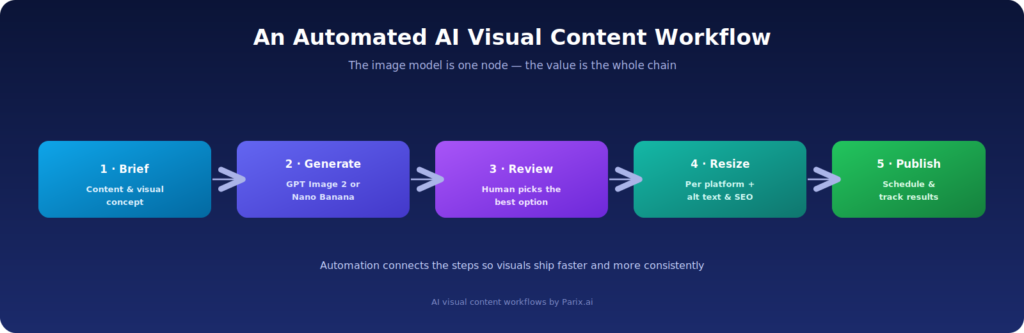
A typical pipeline might start with a content brief, hand it to GPT Image 2 or Nano Banana to generate concepts, route the options to a human for review, then resize for each platform and auto-generate alt text and filenames for SEO. Connecting those steps so the tools talk to each other is exactly what AI integration makes possible.
This is the same shift from manual, one-off tasks to a connected system that we cover in our guide to AI-powered workflow automation. The image model is just one node in the chain; the value comes from the chain running smoothly end to end.
Common Mistakes to Avoid
Whichever tool you use, a few traps come up again and again. Vague prompts are the biggest, “make an ad” gets you generic mush, while a detailed prompt (audience, style, platform, message, brand colors) gets you something usable. Skipping brand guidance leads to off-brand visuals, so spell out colors, tone, and layout. And no matter how good the model is, always review before publishing: check spelling, spacing, logos, faces, hands, numbers, and any UI elements, because AI still slips up on details. Simple, clear designs almost always beat cluttered ones for business use.
How Parix.ai Helps
At Parix.ai, we help businesses move from generating the occasional image by hand to running a proper, automated visual content pipeline, with the right AI tools plugged into a process that creates, reviews, resizes, and publishes at scale. If you’d like to experiment first, our free AI tools are a good place to get a feel for what’s possible before building something bigger.
The Final Word
GPT Image 2 and Nano Banana are both outstanding in 2026, and you won’t go wrong with either. Lean toward GPT Image 2 for polished, text-heavy, production-ready visuals, and toward Nano Banana for speed, editing, and rapid experimentation, or use them together and get the best of both. Either way, the real edge comes from building them into a smart, automated workflow. If you want help doing exactly that, get in touch with Parix.ai.
FAQs
What is GPT Image 2?
It’s OpenAI’s image generation model (also called ChatGPT Images 2.0), launched in April 2026. It’s the first image model with native reasoning, planning and checking an image before producing it, with strong text rendering and up to 2K output.
What is Nano Banana?
“Nano Banana” is the nickname for Google’s Gemini image models. The original is Gemini 2.5 Flash Image, built for fast, high-volume generation and editing. Google’s higher-end Nano Banana Pro (Gemini 3 Pro Image) adds reasoning, top-tier text rendering, and up to 4K.
Which is better for business visuals?
Both are excellent. GPT Image 2 tends to be stronger for polished, text-heavy, production-ready assets, while Nano Banana excels at speed, variations, and quick editing. The best choice depends on your task and which ecosystem you already use.
Which renders text more accurately?
Both have strong text rendering in 2026. GPT Image 2 is excellent with dense, structured text, and Google’s Nano Banana Pro is now comparable. Always proofread the final image, as small text can still occasionally come out wrong.
Can I use both tools together?
Yes, and many teams do. A common approach is to explore ideas and iterate quickly with Nano Banana, then produce the final, polished version with GPT Image 2, ideally inside an automated content workflow.