GPT Image 2 vs Nano Banana: Which AI Image Tool Creates Better Business Visuals, Ads, and Brand Content?

shares

GPT Image 2 vs. Nano Banana: Compare AI Image Tools to See Which One Generates Better Business Images, Creative Ads, and Brand Content Faster and Smarter!

Parix AI Team

AI image generation has evolved from simple experimentation into a practical tool for businesses. Today, companies use these tools to create marketing visuals, social media graphics, banners, mockups, and advertisements much faster than traditional methods. Businesses can further scale this process by using AI workflow automation to streamline visual content creation.

As more tools become available, many businesses face an important decision.

Should you choose GPT Image 2 or Nano Banana for your image generation needs?

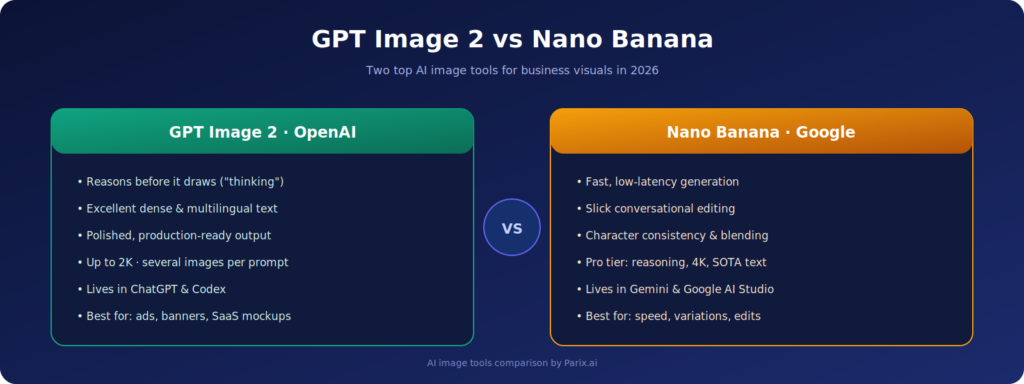
While both tools serve similar purposes, they are built with different strengths. GPT Image 2, developed by OpenAI, focuses on high-quality image generation with strong text rendering and structured visual outputs. It is well-suited for businesses that need consistent, brand-aligned visuals.

Nano Banana, also known as Gemini 2.5 Flash Image, is designed for speed and quick generation. It is useful for rapid iterations and fast content creation when turnaround time is critical.

Both tools help businesses create scalable and campaign-ready visuals. The right choice depends on whether your priority is precision and consistency or speed and flexibility.

This article compares GPT Image 2 and Nano Banana from a business perspective, helping organizations understand which tool is better suited for marketing, application development, and content creation needs.

GPT Image 2 vs Nano Banana comparison for business AI image generation tools

GPT Image 2

GPT Image 2 is an image generation model developed by OpenAI. It can generate images from text prompts and also modify existing images using both text and image inputs. According to OpenAI, GPT Image 2 is a high-performance tool designed to create and edit high-quality visuals efficiently.

Businesses can use GPT Image 2 for a wide range of purposes, including creating ad creatives, blog images, website graphics, product visuals, SaaS dashboard concepts, and campaign banners.

One of its key strengths is the ability to produce structured, production-ready visuals. OpenAI has highlighted in its image generation documentation that models like gpt-image-2 can create and edit images by processing text prompts and optional image inputs.

GPT Image 2 is also connected to ChatGPT Images 2.0, which introduces improvements such as better text rendering, multilingual support, and enhanced visual reasoning. These features are particularly important for business use cases, where clarity in visuals and text plays a critical role in ads, banners, and promotional graphics.

Overall, GPT Image 2 is a strong choice for businesses that need professional, consistent, and high-quality visuals based on clear and structured instructions.

Nano Banana

Nano Banana is the commonly used name for Google’s Gemini 2.5 Flash Image model. It is designed as a fast image generation system that focuses on high-speed output, low latency, and efficient creative workflows.

Its popularity comes from its speed and image editing capabilities. Nano Banana allows users to create, edit, and transform images quickly using natural language prompts, making it suitable for fast-paced content creation.

According to Google’s developer documentation, Gemini 2.5 Flash Image includes features such as blending multiple images, maintaining character consistency, applying targeted transformations through natural language, and using contextual knowledge to improve image generation and editing.

These capabilities make it useful across different industries. For example, marketing teams can use it to generate image variations, edit visuals quickly, and experiment with different creative concepts.

Overall, Nano Banana is a practical choice for businesses that prioritize speed, flexibility, and rapid iteration in their visual content workflows.

Comparing GPT Image 2 and Nano Banana for Business Use

Both GPT Image 2 and Nano Banana can help businesses create high-quality visuals, but they serve different purposes depending on specific needs.

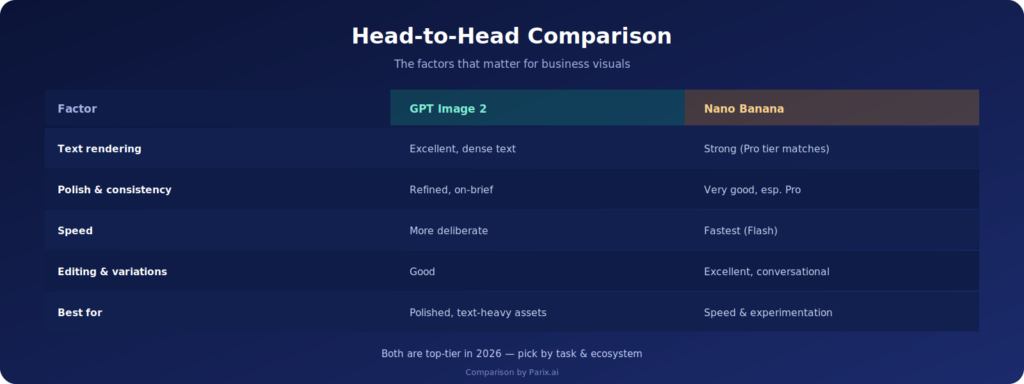
GPT Image 2 is better suited for scenarios where businesses require professional and well-structured visuals. It performs particularly well for content that includes text, such as advertisements, blog images, website graphics, and SaaS-related visuals.

Nano Banana, on the other hand, is more effective when speed and flexibility are the priority. It is ideal for quick edits, creative experimentation, blending multiple visuals, and making rapid changes.

Businesses should avoid choosing a tool based solely on popularity. Instead, the decision should be based on the specific purpose and type of content being created.

For example, if the goal is to create a professional LinkedIn advertisement, website banner, blog image, or SaaS visual, GPT Image 2 is likely the better option.

However, if the requirement involves editing images, experimenting with creative ideas, or combining multiple visual references, Nano Banana may be more effective.

In many cases, the most practical approach is to use both tools based on their strengths rather than relying on a single solution.

Which Tool Is Best for Creating Business Visuals?

Business visuals should be professional, informative, and consistent with brand identity. They are not created just for decoration; they should communicate a clear message, support campaigns, and highlight the value of products or services.

GPT Image 2 is well-suited for this purpose because it focuses on producing high-quality, structured visuals that closely follow instructions. According to OpenAI image generation documentation, the model supports improved text rendering and visual reasoning.

With GPT Image 2, businesses can create a wide range of visuals, including website hero images, featured blog graphics, SaaS dashboard mockups, campaign visuals, LinkedIn graphics, brand storytelling content, and presentation visuals.

Nano Banana can also be used for business visuals. However, its main strength lies in speed and flexibility. It is particularly useful for generating multiple variations, testing ideas, and experimenting with different visual concepts.

In general, GPT Image 2 is a better choice for polished, production-ready visuals, while Nano Banana is more effective for rapid iteration and creative exploration. The right option depends on your priorities—quality and consistency or speed and experimentation.

Which Tool Is More Appropriate for Creative Ads and Campaign Creation?

Which Tool Is More Appropriate for Creative Ad

Ad creatives play a key role in marketing performance. Well-designed visuals can capture attention, increase engagement, and make campaigns more memorable.

GPT Image 2 is particularly effective for creating structured, high-quality ad visuals. It works well for use cases such as LinkedIn ads, SaaS campaigns, B2B marketing, and product promotions. The tool can generate visuals that follow clear instructions, maintain brand consistency, and present a professional design style.

For example, a business can provide a detailed prompt describing the desired visual concept, style, and message, and GPT Image 2 can generate a polished advertisement aligned with those requirements.

Nano Banana, while not a direct replacement in such scenarios, is still valuable in the creative process. Its strength lies in generating variations, refining elements, and experimenting with different visual directions. It is especially useful for exploring ideas quickly and testing multiple concepts.

A practical approach to ad creation is to combine both tools based on their strengths. Teams can use Nano Banana for rapid ideation and experimentation, then use GPT Image 2 to produce more polished and campaign-ready visuals.

This workflow can be supported by reviewing final designs, testing different variations in campaigns, and using performance data to improve future creatives. By combining speed and quality, businesses can create more effective and scalable advertising strategies.

Which Tool Renders Text and Visuals More Accurately?

One of the common challenges with AI-generated images is inaccurate or distorted text. For business visuals such as advertisements, banners, UI elements, and product graphics, clear and correct text is essential. Without it, the visuals may not be suitable for publishing.

GPT Image 2 addresses this challenge effectively. According to OpenAI’s updates, improvements in text rendering, multilingual support, and visual reasoning make it more reliable for creating structured business visuals. It is particularly useful when designing content that includes headlines, labels, or detailed information.

This makes GPT Image 2 a strong option for creating advertisements, posters, banners, infographics, and website graphics where both visuals and text need to work together clearly.

Nano Banana also offers strong visual editing and fast design capabilities. However, when text accuracy and professional layout are critical, GPT Image 2 tends to perform more consistently.

Even with these improvements, it is important not to rely entirely on AI-generated outputs. Always review visuals carefully before publishing, including checking spelling, spacing, typography, layout, faces, hands, numbers, charts, and UI elements.

Which Tool Is Better for Brand Content and Storytelling?

Consistency is essential in brand content. Visuals should reflect a company’s tone, color palette, and overall identity. Without consistency, it becomes difficult to build trust and recognition.

GPT Image 2 is well-suited for creating structured brand visuals. It allows businesses to generate images based on clear prompts, making it easier to communicate ideas and build a cohesive visual narrative.

For example, a workflow automation company can use GPT Image 2 to visually represent transitions such as moving from manual processes to automated systems, shifting from disconnected tools to a unified platform, or transforming teams into more efficient, AI-driven operations.

Nano Banana can also support storytelling, particularly in scenarios that require consistent characters, image blending, and repeated visual elements. These capabilities can help maintain continuity across a series of visuals.

In general, GPT Image 2 is more effective for building structured, brand-aligned stories, while Nano Banana is useful for creating flexible, evolving visual narratives through rapid experimentation. The right choice depends on how the brand wants to present its story.

Which Tool Is Better at Text, Layout, and Image Quality?

Text accuracy has been a common challenge in AI-generated images. Businesses often need visuals that include headlines, labels, buttons, product names, or short campaign messages. If the text is incorrect or unclear, the image may not be suitable for use.

GPT Image 2 addresses this issue with improvements highlighted in OpenAI’s updates, including better text rendering, multilingual support, and stronger visual reasoning. It also offers high-quality image generation and more reliable editing capabilities, making it suitable for structured, production-ready visuals.

This makes GPT Image 2 particularly useful for creating advertisements, posters, banners, infographics, and website graphics where both layout and text clarity are important.

Nano Banana also performs well for visual editing and fast image generation. However, when precise text placement and professional layout are critical, GPT Image 2 tends to be the more consistent option.

Regardless of the tool used, AI-generated visuals should always be reviewed before publishing. Businesses should check spelling, spacing, typography, layout, logos, faces, hands, numbers, charts, and UI elements to ensure accuracy and quality.

What Is the Better Tool for Image Editing and Experimentation?

What Is the Better Tool for Image Editing and Experimentation

Nano Banana stands out when it comes to speed and experimentation. Google describes Gemini 2.5 Flash Image as a model designed for conversational editing and low-latency creative workflows, making it suitable for handling large volumes of image tasks quickly.

This makes it especially useful for tasks such as changing backgrounds, adjusting lighting, replacing objects, creating multiple campaign variations from a single image, maintaining the same character across different scenes, merging reference images, or refining visuals to achieve a more polished look.

GPT Image 2 also supports image editing and high-quality generation, as noted in its API capabilities. However, when it comes to rapid iteration and testing multiple visual ideas, Nano Banana tends to offer more flexibility.

In general, Nano Banana is well-suited for experimentation and quick iterations, while GPT Image 2 is more appropriate for producing refined, production-ready results.

Best Use Cases for GPT Image 2

GPT Image 2 is well-suited for businesses that require high-quality, polished, and marketing-ready visuals. It performs best in scenarios where structure, clarity, and professional presentation are essential.

Typical use cases include creating LinkedIn ad graphics, website hero images, blog featured visuals, SaaS dashboard mockups, product feature illustrations, B2B marketing creatives, infographics, brand storytelling visuals, presentation graphics, and social media campaign assets.

The tool is particularly valuable for companies that need structured outputs. For example, a SaaS business may require a clean and professional dashboard mockup, while a marketing team may need campaign visuals with clear and readable text.

Since GPT Image 2 supports both text and image inputs, it can also be integrated into collaborative workflows. Teams can upload reference images, product screenshots, or design guidelines and generate consistent visual variations aligned with their requirements.

Ideal Uses of Nano Banana

Nano Banana is well-suited for businesses that prioritize speed, creativity, and flexible image editing. It performs best in environments where rapid iteration and experimentation are important.

Common use cases include generating multiple image variations, editing product visuals, replacing backgrounds, maintaining character consistency across images, combining references, and exploring creative concepts for social media and advertising.

It is particularly useful for teams that need to produce content at scale. For example, social media teams can create multiple campaign variations, e-commerce businesses can test different product backgrounds, and creative teams can experiment with styles before finalizing designs.

According to Google, Nano Banana is designed for high-volume image generation and conversational editing, making it a practical choice for fast and flexible creative workflows.

Ideal Uses of Nano Banana

Nano Banana is well-suited for businesses that prioritize speed, creativity, and flexible image editing. It performs best in environments where rapid iteration and experimentation are important.

Common use cases include generating multiple image variations, editing product visuals, replacing backgrounds, maintaining character consistency across images, combining references, and exploring creative concepts for social media and advertising.

It is particularly useful for teams that need to produce content at scale. For example, social media teams can create multiple campaign variations, e-commerce businesses can test different product backgrounds, and creative teams can experiment with styles before finalizing designs.

According to Google, Nano Banana is designed for high-volume image generation and conversational editing, making it a practical choice for fast and flexible creative workflows.

Common Issues When Using AI Image Generators

Although tools like GPT Image 2 and Nano Banana are powerful, users may encounter several challenges when creating AI-generated visuals.

One common issue is the use of vague prompts. For example, a simple instruction like “create an ad” may lead to irrelevant or generic results. To achieve better outcomes, prompts should include clear details such as target audience, visual style, platform, message, and brand direction.

Another challenge is maintaining brand consistency. Without specific guidance, AI-generated visuals may not align with a company’s identity. It is important to define elements such as colors, tone, layout preferences, and branding details.

Text accuracy can also be a concern. While AI models have improved, generated visuals should always be reviewed for spelling, formatting, and clarity before publishing.

In some cases, visuals may appear overly complex or cluttered. For business use, it is usually better to keep designs simple, clear, and easy to understand.

Finally, AI tools should not be used in isolation. The best results come from combining AI image generation with a structured content creation workflow that includes review, refinement, and strategic planning.


That’s where your current content angle at Parix.ai excels: you’re currently linking GPT Image 2 with business visuals, advertising images, marketing copy, SaaS visuals, and workflow automation.

Choosing the Right AI Image Tool for Your Business Needs

Choosing the right AI image tool depends on your specific goals and how you plan to use visual content within your business.

GPT Image 2 is a better fit when the focus is on professional and structured visuals. It is well-suited for creating clean designs, improving text clarity, maintaining brand consistency, and producing marketing assets such as blog images, banners, product visuals, and campaign graphics.

Nano Banana is more suitable when speed and flexibility are the priority. It works well for rapid editing, generating multiple variations, blending images, maintaining character consistency, and creating quick concepts for social media or experimental campaigns.

For many businesses, the most effective approach is to use both tools together. Nano Banana can support early-stage exploration and fast iterations, while GPT Image 2 can be used to produce refined, production-ready visuals.

The real advantage comes from building a structured workflow that allows teams to create, edit, review, approve, publish, and analyze visual content efficiently. With the right process in place, businesses can significantly improve both the speed and quality of their visual content production.

How Parix.ai Enables Automated AI Visual Content Workflows

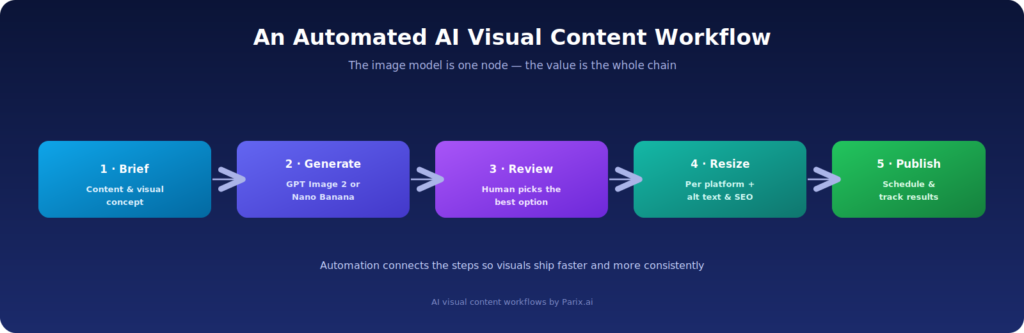
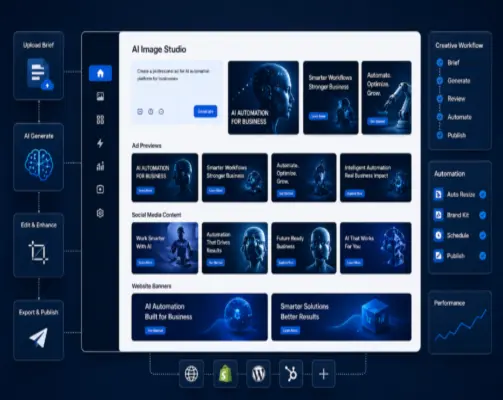
AI workflow automation for visual content creation using GPT Image 2 and Nano Banana

AI image generation tools become significantly more powerful when combined with automation. While businesses can create visuals manually, this approach often does not scale efficiently or address the full content workflow.

Parix.ai helps organizations build automated workflows that integrate AI image generation into a structured content process, improving speed, consistency, and overall efficiency.

For example, a typical workflow can begin with topic approval for a blog post, followed by AI-generated content briefs. Based on this, tools like GPT Image 2 or Nano Banana can generate visual concepts aligned with the content.

The marketing team can then review and select the most suitable visuals, after which images are resized for different platforms such as blogs and social media. AI can also assist in generating alt text and file naming to support SEO and accessibility.

Finally, the content can be scheduled for publication, and performance can be tracked to optimize future campaigns. This transforms image creation from a manual task into a repeatable and scalable business process.

Parix.ai’s focus on AI workflow automation, SaaS development, dashboards, and content systems aligns well with this approach. By combining AI tools with automation, businesses can streamline visual content production and operate more efficiently.

The Final Word: GPT Image 2 or Nano Banana?

Choosing between GPT Image 2 and Nano Banana ultimately depends on your business goals and how you plan to use visual content.

If your priority is structured, polished, and marketing-ready visuals, GPT Image 2 is likely the better option. It performs well for use cases such as advertisements, banners, blog visuals, SaaS mockups, product graphics, and other business-focused content.

On the other hand, Nano Banana is better suited for speed, flexibility, and experimentation. It is useful for quick edits, generating variations, blending images, and exploring creative ideas within fast-paced workflows.

The right choice depends on what you need from an AI image tool. In many cases, businesses benefit from using both tools together—leveraging Nano Banana for experimentation and GPT Image 2 for final, production-ready outputs.

However, the real advantage comes not just from using AI tools, but from integrating them into a structured creative process. When image generation is combined with AI workflow automation, businesses can achieve greater efficiency, consistency, and scalability.

This is where Parix.ai can support your business—helping you move from manual content creation to fully automated workflows that streamline visual production and improve overall performance.