AI Automation Mistakes: Why Business AI Projects Fail After Launch
The era of AI automation is no longer something from the future. Today, companies are using AI to communicate with customers, prequalify leads, take meeting notes, update CRM records, compile reports, analyze data, and automate routine tasks.
The concept is simple: save time, reduce manual effort, increase productivity, and allow teams to focus on higher-priority work.
But here is the real challenge:
Many AI automation projects look successful in the demo but fail after implementation.
The reason behind this disappointment is often not the technology itself. In many cases, the company has not prepared the workflow, data, people, tools, approval process, and KPIs needed before launch. AI can speed up a strong process, but it can also speed up an ineffective one.
This is why the term AI automation mistakes is becoming increasingly important for business owners, entrepreneurs, managers, and operations professionals.
Businesses are no longer only asking:
“How can we implement AI?”
They are also asking:
“Why does our AI automation fail?”
“Why is our AI agent giving inaccurate results?”
“Why are employees not using the system?”
“Why are we not seeing ROI from AI?”
These questions are valid. AI can create real business value, but only when it is connected to clear problems, reliable data, secure workflows, and measurable outcomes.
So, when considering AI automation for your business, the objective should not simply be:
“Implement AI wherever possible.”
The real objective should be:
“Build AI systems that solve concrete challenges, fit into existing processes, use credible data, and deliver tangible business value.”
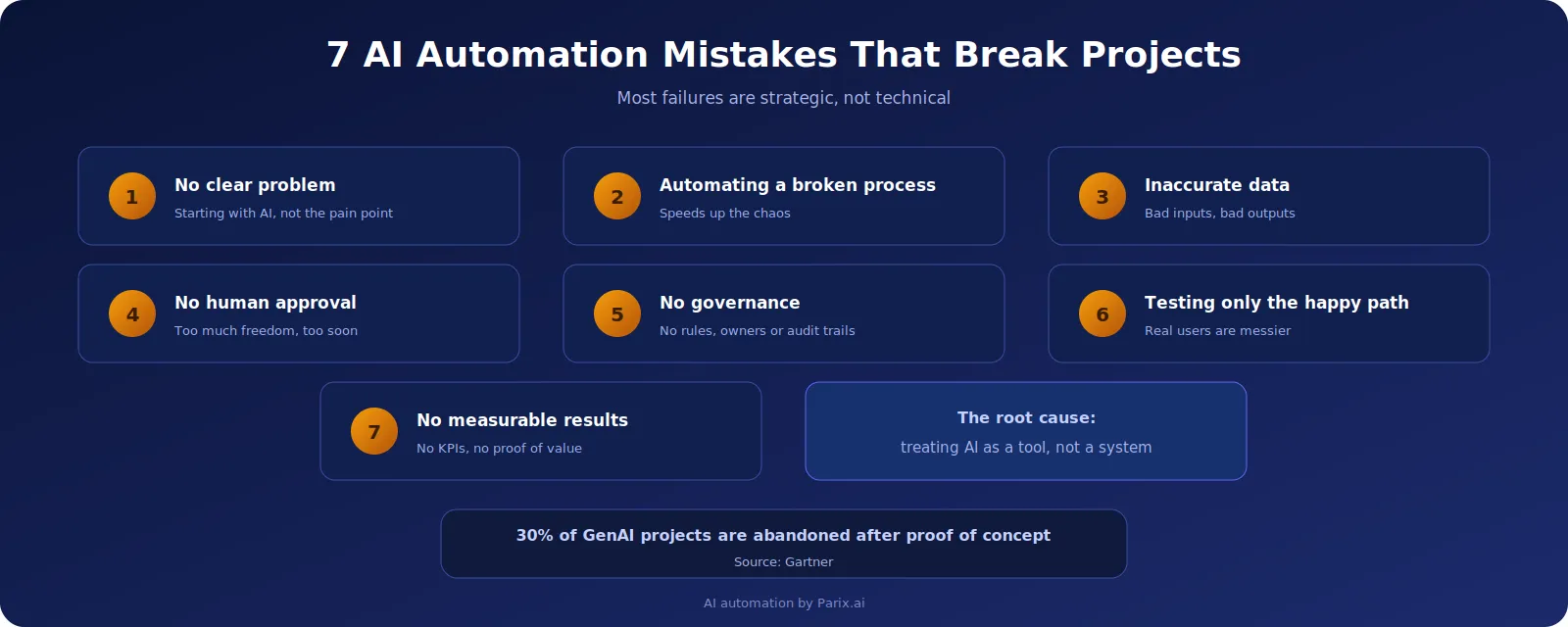
Below are the most common AI automation mistakes that cause business projects to fail after launch — and how your business can avoid them.
1. Beginning With AI Automation Without a Clear Problem

A major mistake businesses make with AI automation is beginning with the technology instead of the problem.
Many teams start with questions like:
- “Can we create an AI-powered chatbot?”
- “Can we use ChatGPT for this?”
- “How can we automate our processes with AI?”
- “What can we do with AI on our website or CRM?”
These are useful questions, but they should not be the first questions.
The better question is:
What business problem are we trying to solve?
AI automation gives the best results when it is connected to a painful, repetitive, and measurable problem.
For example:
- Your team spends too much time responding to the same customer questions.
- Your sales reps manually qualify every lead.
- Your operations staff copy information from emails into spreadsheets.
- Your managers wait too long for reports.
- Your support team misses important follow-ups.
These are real business problems. They cost time, money, and customer trust.
However, when a company starts a project with “we need AI” but does not define the actual pain point, the project becomes weak from the beginning. The team may create something impressive, but nobody uses it because it does not solve an urgent problem.
A better way to design an AI automation project is to answer these questions first:
- Which process takes too long or feels repetitive?
- Who handles that process today?
- How much time does it take every week?
- What errors happen in the current process?
- Which tools are involved?
- What result do we expect after automation?
- How will we measure success?
For example, “we need an AI agent” is too generic.
A stronger goal would be:
“We need an AI agent that qualifies website leads, checks CRM history, drafts follow-up emails, and alerts the sales team within five minutes.”
That is specific. That is measurable. That is useful.
This is how an AI automation project becomes valuable. It moves from being a random tool to becoming an important part of the business infrastructure.
2. Automating a Broken Process

Automation is not the solution for a faulty workflow — at least not by itself.
In many cases, automation reveals workflow problems even faster.
This is another reason why AI automation fails after launch. A company tries to automate a process that is already complicated, inconsistent, or poorly documented. As a result, the automated solution repeats the same problems.
Imagine a business wants to automate customer support replies.
But the company has:
- No updated FAQ
- No clear refund policy
- No escalation process
- No approved tone of voice
- No defined human approval process
In this situation, an AI support system may give low-quality replies, miss important details, or provide answers that do not match the company’s policy.
The same issue can happen in any department.
Bad CRM data leads to bad AI output.
Unclear approval processes confuse the automation.
Five different spreadsheets can make AI use the wrong data.
No workflow owner means nobody maintains the automation.
Before implementing AI automation, the organization should first map the workflow.
This does not need to be complicated. A simple process map can show:
- Where the process starts
- What data is needed
- Which tools are involved
- Who approves the result
- What happens if something fails
A workflow map should answer:
- What triggers the process?
- What information is necessary?
- Which actions are manual?
- Which steps are repetitive?
- Where do errors usually happen?
- Which actions require human decision-making?
- Which steps can AI automate safely?
This step is important because automation should not blindly copy the existing workflow. Sometimes the process needs to be improved before AI is added.
For example, if lead follow-up is slow because the sales team manually checks forms, emails, and CRM notes, AI can help. But before implementing automation, the business should define:
- What makes a lead qualified?
- Which data should be checked?
- When should follow-up happen?
- When should a human sales rep step in?
This is the difference between simple automation and smart automation.
3. Using Inaccurate Data and Weak Knowledge Sources

Data is the foundation of AI automation.
If the data is outdated, incomplete, inaccurate, or poorly organized, the AI output will also be unreliable.
This is one of the most common AI implementation mistakes.
A company may want AI to answer customer questions, but its knowledge base is outdated. Another company may expect AI to generate sales reports, but its CRM has missing fields. A business may want AI to analyze processes, but the data is scattered across emails, spreadsheets, and old systems.
AI is powerful, but it is not magic. It cannot create accurate and meaningful business insights from poor-quality data.
Every AI automation project should define clear and trusted data sources.
For example:
- Customer inquiries should come from approved support documents.
- Sales automation should rely on valid CRM records.
- Financial automation should use verified accounting data.
- Reporting automation should use updated dashboards or databases.
- Internal AI assistants should use approved SOPs and policy documents.
The business should also define which data AI should not access.
This is important for security and privacy. Not every AI solution needs access to every company file, customer record, or internal document.
A well-designed AI automation framework should include clear data rules:
- What is the source of truth?
- Who owns the data?
- How often is the data updated?
- What data can AI access?
- What data is restricted?
- What should AI do when information is missing?
- How will wrong results be corrected?
In many cases, technical expertise is required here. Integrating AI into business systems is about more than connecting two APIs. It requires data structure, permissions, rules, testing, and ongoing monitoring.
This is where Parix.ai can help businesses build structured AI integrations. Business AI should not work only in a prompt environment. It should operate inside the real systems your team already uses.
4. No Human Approval for High-Stake Operations
Another critical mistake in AI automation is giving AI too much freedom too soon.
Some tasks can be fully automated. But some tasks should always require human approval.
The problem begins when companies treat every AI output as safe for automatic execution.
For example, an AI tool can usually handle low-risk tasks such as:
- Summarizing meeting notes
- Drafting a reply
- Classifying a support ticket
- Preparing a report draft
But high-stake actions are different.
These may include:
- Sending customer emails
- Processing refunds
- Changing CRM deal stages
- Publishing content
- Modifying invoices
- Making compliance-related decisions
When these actions happen without review, they can create serious business risks.
The more actions an AI model can perform, the more important human approval becomes.
This is especially true when using AI agents. Unlike regular chatbots, AI agents can reason, use tools, retrieve information, and trigger actions across business applications.
That is powerful, but it also requires control.
A safe AI automation system should include human oversight. AI can help prepare the work, but humans should approve important decisions before they are executed.
For example:
- AI drafts the customer response, but support approves it.
- AI suggests a refund decision, but finance confirms it.
- AI recommends a CRM change, but sales approves it.
- AI creates a report, but a manager reviews it.
- AI prepares an email campaign, but marketing approves it before sending.
This does not reduce the value of automation. It makes automation safer, more reliable, and easier to trust.
Over time, once the system proves its accuracy, some low-risk actions can become fully automated. But sensitive operations should always have clear approval rules.
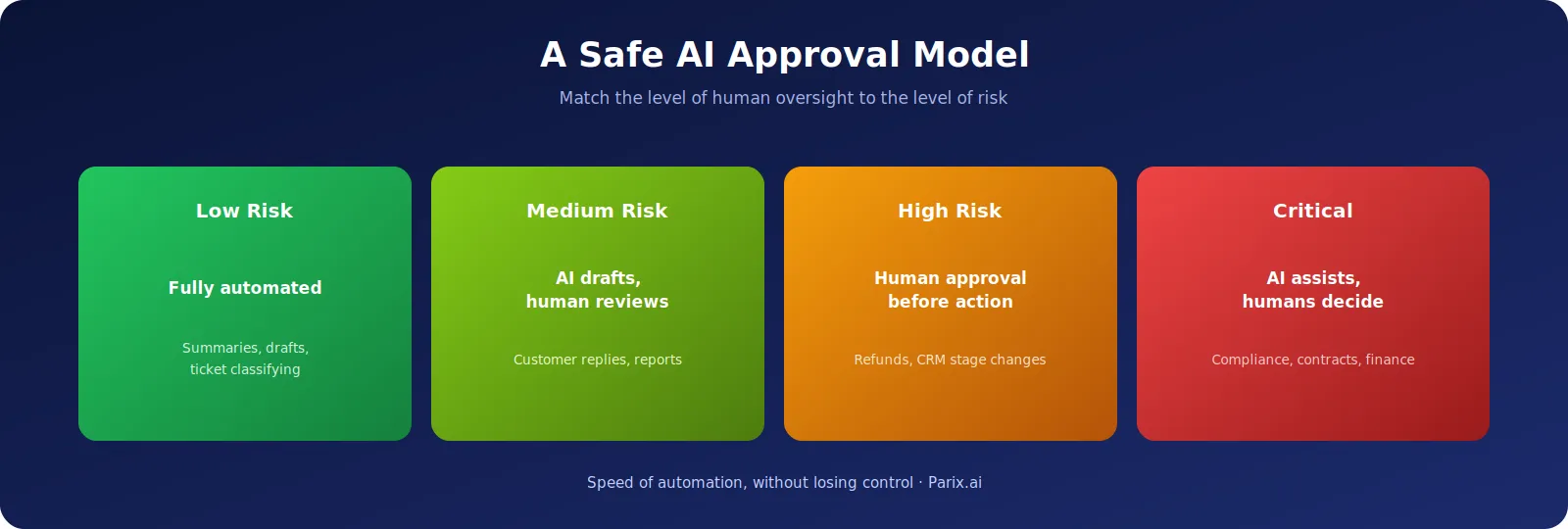
A practical approval model can look like this:
Low-Risk Tasks
Fully automated.
Medium-Risk Tasks
Prepared by AI and reviewed by a human.
High-Risk Tasks
Human approval required before the action is performed.
Critical Tasks
AI assists, but final decision-making stays with humans.
This approach gives businesses the speed of automation without losing control.
5. Failing to Account for Security, Permissions, and Governance

Many AI automation initiatives fail because businesses do not control the system properly after launch.
Governance simply means your organization has clear policies for:
- How AI is used
- Who owns the automation
- What permissions AI has
- How errors are handled
- Who can change workflows
- What data AI can access
Without governance, AI automation can create significant risks.
Employees may connect tools without permission. AI may access confidential information. Prompts may be changed without review. Outputs may not be logged. No one may know who is responsible when an error happens.
This is becoming more important because AI tools have moved far beyond simple content generation.
Today, AI can interact with CRMs, emails, finance tools, customer support platforms, dashboards, and internal systems. That means businesses must know exactly what AI can and cannot do.
A business should define:
- Who owns each AI workflow?
- Who can edit prompts?
- Who can connect new tools?
- Which data can AI access?
- What actions can AI perform?
- Where are logs stored?
- How are errors reviewed?
- Who can approve changes after deployment?
AI automation without governance may work for a few days or weeks. But as more users, data, and processes are added, the system becomes harder to manage.
Strong governance should include:
- Role-based access management
- Clear permission levels
- Audit trails
- Approval workflows
- Data privacy protection
- Prompt version control
- Pre-deployment testing
- Regular performance reviews
- Error management
- Ownership for every process
These considerations are even more important for organizations implementing AI across CRM, email, finance, customer service, marketing, and internal operations.
Security should not be added later. It should be part of the project from the start.
6. Testing Only the Happy Path
A demo is not the same as real business use.
Many AI automation projects fail because they are tested only with simple examples.
During the demo, everything looks clean:
- The customer asks a clear question.
- The CRM data is complete.
- The process flows smoothly.
- The AI gives a strong answer.
But real-life users behave differently.
Customers ask unclear questions. Leads leave forms incomplete. Employees send messages with typos. Data fields are missing. Customers ask for exceptions. Some requests are emotional, urgent, or confidential.
Some requests should not be answered by AI at all.
If AI automation is not tested with realistic edge cases, failure after launch is likely.
Every company should test AI automation with complex examples, not only simple ones.
For Customer Support Automation, Test:
- Angry customer messages
- Refund requests
- Incomplete questions
- Policy exceptions
- Complex multi-step requests
- Confidential questions
- Questions that should be escalated
- Questions that AI should not answer
For Sales Automation, Test:
- Spam leads
- Duplicate leads
- Incomplete forms
- Existing customers
- Incorrect phone numbers
- Low-intent leads
- High-value leads
- Leads from different locations
For Reporting Automation, Test:
- Missing values
- Duplicate rows
- Incorrect date formats
- Conflicting numbers
- Stale data
- Unexpected spikes
- Data from multiple systems
Testing should also evaluate tone, accuracy, speed, security, and escalation.
Good AI does not only know when to respond. It also knows when not to respond.
That is an essential part of professional AI automation.
A business must also monitor the AI system after deployment. AI automation cannot remain static. It should improve based on real performance.
This includes:
- Reviewing outputs
- Logging errors
- Updating prompts
- Improving workflows
- Refreshing data sources
- Collecting user feedback
The best AI systems become stronger over time because the business continues to improve them.
7. Lack of Measurable Results After Launch
One of the worst mistakes in AI automation is launching a system and never measuring the results.
A company may introduce an AI workflow, announce it internally, and assume it is saving time. But if no one tracks performance, the company cannot know whether the system is actually helping.
This is one reason many automation projects lose momentum.
Managers stop supporting the system because there is no clear proof of value. Employees stop using it because they do not trust the output. The automation remains active, but it does not create measurable business impact.
Before launching an AI automation project, define the KPIs.
Ask:
- How many hours should this automation save each week?
- How much faster can customers be served?
- How many manual errors should be reduced?
- How many leads should qualify through automation?
- How many support tickets should be resolved faster?
- How much reporting time should be saved?
- How many follow-ups should happen on time?
- What cost savings or revenue impact is expected?
Different workflows need different KPIs.
For Customer Support Automation
Track response time, resolution rate, escalation rate, customer satisfaction, and answer accuracy.
For Sales Automation
Track lead response time, qualified leads, booked calls, follow-up completion, and conversion rate.
For Internal Reporting Automation
Track hours saved, report accuracy, decision-making speed, and user adoption.
For Finance Automation
Track processing time, error reduction, approval speed, and compliance issues.
The right AI automation dashboard should answer:
- Is the automation being used?
- Is it saving time?
- Is it reducing errors?
- Is it improving customer or employee experience?
- Is it creating new risks?
- What should be improved next?
What you cannot measure, you cannot optimize. And what you cannot optimize will eventually fail.
Why AI Automation Projects Fail After Launch
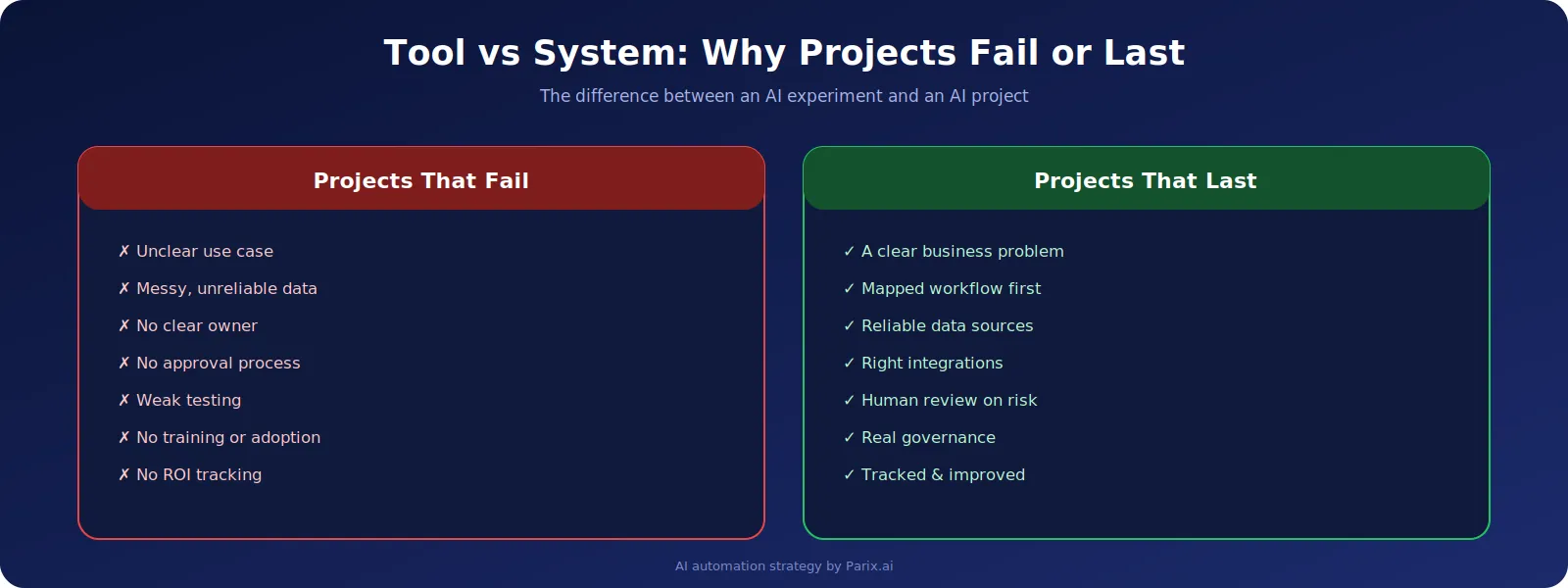
AI automation projects fail after launch because many businesses treat AI like a tool instead of a system.
A tool can write, summarize, classify, or generate.
But a business system must connect people, processes, data, software, approvals, governance, and results.
That is the difference between an AI experiment and a successful AI automation project.
A failed AI automation project usually has:
- An unclear use case
- An unorganized workflow
- Unreliable data sources
- Too much or too little system access
- No clear owner
- No approval process
- Weak testing
- No employee training
- No ROI measurement
- No post-launch improvement
A successful AI automation project has:
- A clear business problem
- Workflow mapping before automation
- Reliable data sources
- Integration with the right tools
- Human review for risky actions
- Security and governance policies
- Real-world testing
- Performance tracking after launch
- Continuous improvement
This is where AI automation becomes a real business advantage.
How Parix.ai Helps Businesses Avoid AI Automation Failures
AI automation may feel overwhelming for businesses that have too many tools, disorganized data, manual processes, and unclear workflows.
You may know that AI can help your business, but you may not know where to start or how to implement it safely.
This is where Parix.ai comes in.
Parix.ai helps businesses build AI-powered solutions for workflow automation, smart data integration, and process optimization. These services help companies improve productivity, reduce costs, and grow faster.
Instead of adding AI randomly, Parix.ai helps businesses create automation around clear business goals.
This may include:
- Identifying the current workflow
- Selecting the most valuable task to automate first
- Connecting AI with CRM, email, forms, dashboards, or internal tools
- Creating AI agents for business processes
- Designing approval workflows
- Configuring data sync between systems
- Creating performance dashboards
- Testing and debugging automation workflows
- Improving automation based on user feedback
Successful AI automation is not only about the AI model. It is about the complete ecosystem around the model.
For example, if your company needs an AI lead qualification tool, Parix.ai can help design how leads enter the pipeline, how AI scores them, how CRM information is checked, how the sales team is notified, and how follow-ups are tracked.
If your company needs AI customer support automation, Parix.ai can help organize the knowledge base, implement safe response rules, add human intervention, and integrate support workflows into your existing systems.
If your company needs internal reporting automation, Parix.ai can help connect data sources, generate reports, reduce copy-pasting, and build dashboards that support better decision-making.
The goal is not to replace your team.
The goal is to remove unnecessary repetitive tasks so your team can focus on work that requires strategy, creativity, and human judgment.Conclusion
AI automation can bring great benefits to your company, but only when it is planned and implemented correctly.
The biggest AI automation mistakes are not only technical mistakes. They are strategic mistakes.
Companies fail when they:
- Start with AI instead of a business problem
- Automate broken workflows
- Use poor data
- Skip human approval
- Ignore security and governance
- Test only simple cases
- Forget to measure ROI
The companies that succeed with AI automation will not be the ones chasing every new tool. They will be the ones building functional, secure, measurable, and scalable systems.
If your business is dealing with manual processes, disconnected tools, poor data quality, delayed follow-ups, or inefficient workflows, you do not have to solve everything alone.
Parix.ai is available to help you make your AI automation project more successful.
With the right strategy, the right workflow, and the right technical partner, your company can use AI automation to save time, reduce errors, improve productivity, and grow with confidence.