AI and GPT Integration Services: Connecting AI to the Tools You Already Use
AI and GPT integration services connect artificial intelligence to the software your business already runs on: large language models like GPT, plus AI agents and machine-learning services, wired into your existing tools so they can read your data, automate tasks, and act where the work actually happens. It is not about replacing your tools. It is about making the ones you already rely on think.
Most companies don’t run on one system. They run on a dozen, each holding its own slice of data, while someone quietly copies information between them all day. AI integration ends that busywork. Below we cover what it means, what the services include, why integration now matters more than adoption, where it pays off first, the mistakes that sink projects, and the shift everyone is racing toward: from chatbots that answer to AI agents that act.

What is AI integration?
AI integration means connecting AI models and services, including LLMs such as GPT, to the apps your business already uses, so the AI can analyze data, automate tasks, and support decisions inside your existing systems. The goal isn’t a shiny new app sitting off to the side. It’s intelligence built into the tools your team already opens every day.
In practice that means AI plugged into your CRM to run lead follow-ups, into your support desk to answer and route tickets, into your marketing stack to personalize campaigns, and into your internal tools to build reports on their own. That is exactly what good AI integration services deliver: familiar tools that quietly start doing far more.
What do AI and GPT integration services include?
LLM integration connects a large language model such as GPT, Claude, or Gemini to your own applications and data, so it can understand plain-language requests and act on real business information. GPT integration is simply LLM integration using OpenAI’s GPT models specifically, and it is the most common starting point for teams adding AI to an existing product.
The difference between a raw model and a real integration is context. On its own, GPT knows nothing about your customers, your CRM, or your pricing. A proper integration connects it securely to your systems so it reads the right data, follows your rules, and writes results back where your team will see them. A typical engagement covers:
- API connection: linking GPT or Claude securely to your CRM, ERP, or helpdesk, such as Salesforce, HubSpot, Zoho, or Zendesk.
- Data synchronization: keeping records accurate and matched across two or more systems, so nothing is duplicated or lost in transit.
- Custom AI chatbot integration: an on-brand assistant that answers from your live data instead of generic training data.
- Workflow automation: connecting the model to tools like Gmail, Slack, Notion, and Zapier so it works where your team already works.
- AI agent integration: giving the model permission to take multi-step actions, with approval gates on anything sensitive.
- Monitoring and governance: logging, audit trails, and human review on the decisions that carry risk.
One decision sits underneath all of this and is easy to get wrong: which model you point at each job. Wiring a single model into everything is the most common way teams overpay, because model pricing varies by an order of magnitude across tiers. Our guide to choosing the right model for each task covers how to route work by difficulty instead. If you want to start smaller and build something yourself first, our custom GPT guide walks through it step by step.
Why integration now matters more than adoption
Buying AI is no longer a differentiator, because almost everyone has done it. What separates companies in 2026 is whether the AI they bought is actually wired into the work.
The gap is wide, and it shows up at every size of business.

- McKinsey’s State of AI report found 88% of organizations now use AI in at least one business function, up from 78% a year earlier, but only 39% could point to a measurable effect on the bottom line.
- A Goldman Sachs 2026 survey of its 10,000 Small Businesses network found 76% of owners already use AI and 93% report a positive impact, yet only 14% say AI is fully embedded in core operations.
- MIT research across more than 300 enterprise deployments found only around 5% of generative AI pilots produced a measurable effect on the P&L, not because the models fall short, but because the surrounding tools and workflows never adapt to context well enough to leave the pilot stage.
- A 2026 NBER survey of nearly 6,000 executives across the US, UK, Germany and Australia found 69% of firms actively use AI, while nine in ten reported no impact on employment or productivity at their own firm over the past three years.
Read those together and the conclusion is hard to avoid. The failure mode is not model quality. It is everything around the model: data access, permissions, where the AI sits in the process, and whether anyone measured a baseline before starting.
That is what integration work actually is, and it is why the companies pulling ahead aren’t the ones that bought the most licences. They’re the ones that connected AI to their own systems and can show what changed.
The benefits, when it works, arrive together:
- Automation of repetitive tasks: data entry, reporting, and notifications run themselves.
- Fewer errors, faster turnaround: removing manual steps removes the mistakes that come with them.
- Smarter decisions based on real-time data instead of gut feel.
- Room to scale: more output without more complexity or headcount.
- Lower operating costs as rework and busywork shrink.
These gains sit right beside broader AI workflow automation, and integration is one of the clearest ways AI workflow automation reduces business costs. Integration connects the systems; automation puts them to work.
Where does AI integration pay off the most?
AI integration pays off fastest in sales and CRM, customer support, marketing, data and analytics, and general process automation: anywhere systems need to talk and decisions need to be made.

- Business process automation: approval flows, task assignment, and syncing data between apps.
- Customer support: AI chatbot integration that pulls from your CRM, knowledge base, and ticketing for instant, accurate answers.
- Sales and CRM: qualifying leads, automatic follow-ups, forecasting, and keeping tools in sync.
- Marketing: AI working across email, ads, and analytics to personalize campaigns.
- Data and analytics: pulling scattered data together and turning it into insight you can act on.
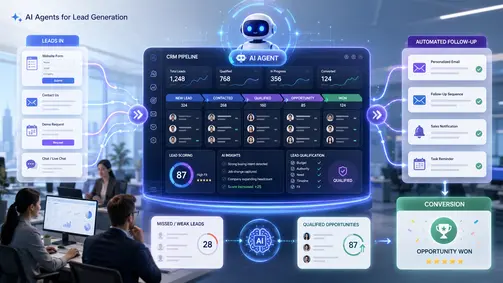
One pattern is worth noting: measurable gains cluster in work with a clear right answer and an easy way to verify it, and drop off sharply in open-ended judgement work. Start where the finish line is obvious. Sales is often where the value lands first and most visibly, because wiring AI into your CRM so it qualifies and follows up with leads on its own recovers revenue that slow follow-up quietly bleeds away. Our guide on AI agents for lead generation and follow-up walks through exactly how.
What a real integration looks like: Donor Bridge
Theory is easy. Here is an integration we built and still run.
A nonprofit was raising money through Classy and keeping its official donor records in DonorPerfect. Two good systems, no connection between them, so staff copied every donation across by hand. That manual step was breeding duplicate donors: the same person entered three times under slightly different details, giving history split across all three records, thank-you letters going out twice, and reporting quietly wrong.
Donor Bridge closed that gap. Donations now flow from Classy into DonorPerfect automatically, and identity matching decides who each gift belongs to: a returning donor’s gift is added to the record that already exists, a genuinely new donor is added cleanly, and any case the system isn’t sure about pauses for a human instead of guessing.
That last rule is the part worth copying. A good integration knows the difference between what it should decide and what a person should decide. Duplicate donor records are not a rounding error to a nonprofit; they are wrong thank-you letters and wrong numbers in the annual report. The integration was designed to fail safely, not confidently.
Why AI integration projects fail
Most failed AI projects were never model problems. They were process problems that a model got dropped into. Five mistakes account for most of them.

- Starting with a tool instead of a process. “We should use AI” is not a project. “Order verification takes two hours every morning” is.
- No baseline measurement. If you never recorded how long the process took before, you cannot prove it got better afterwards, and you will not get budget for the second project.
- Treating permissions as an afterthought. An assistant acting for a user must inherit that user’s access rights, never exceed them. This is one of the most common gaps in early deployments, and the most expensive to retrofit.
- No defined human checkpoint. “The AI does it and someone reviews it” is not a design. Decide in advance which cases pause and who they go to.
- Treating the pilot as disposable. Build the first deployment as the first increment of a production system, not a throwaway demo, or you will build it twice.
The underlying rule: budget the data, permissions and process work as a first-class workstream. The model is usually the smallest part of the effort.
Custom vs off-the-shelf AI: which is better?
Off-the-shelf AI is quick to switch on but generic. Custom AI integration takes a little longer to build but fits your exact workflows, data, and tools, which means higher accuracy and more value over time. The right choice comes down to how specific your needs are.
| Factor | Off-the-shelf AI | Custom AI integration |
|---|---|---|
| Setup speed | Fast | Moderate |
| Fit to your workflow | Generic | Tailored |
| Accuracy on your data | Limited | High |
| Scalability | Constrained | Built to grow |
| Best for | Simple, common needs | Specific, high-value workflows |
In practice most projects are both: buy the plumbing, build only the differentiated logic. Custom integration reflects the same product-minded thinking behind strong SaaS product development: build for the real problem in front of you, not a generic average of everyone’s. The closer the fit, the more the AI is worth.
Chatbot vs AI agent: what’s the difference?
A chatbot answers questions. An AI agent takes multi-step actions across your connected tools, updating a CRM, routing a ticket, completing a follow-up, with light human oversight. The move from chatbots to agents is the defining shift of 2026, and it’s why AI agent integration is now one of the most requested capabilities.

Gartner predicts that 40% of enterprise applications will feature task-specific AI agents by the end of 2026, up from less than 5% in 2025. Integration is what makes those agents useful. An AI agent is only as capable as the systems it is allowed to reach and act on. This is where AI agent development and integration meet: the model provides the reasoning, and the integration gives it the hands to act.
What that looks like in a real product is Brain AI, an assistant we built inside a project management platform. The interesting part isn’t the chat window, it’s the tool-calling architecture behind it: the model doesn’t just describe what should happen to a task or a project, it has permission to go and do it.
This blend of AI and automation across connected systems is what IBM calls intelligent automation, and it is fast becoming the baseline rather than the cutting edge. In Stack Overflow’s 2025 Developer Survey, 84% of developers said they use or plan to use AI tools, up from 76% the year before.
One honest caution: the more an AI agent can do, the more governance matters. Clear permissions, security, audit trails, and a human in the loop for high-stakes actions are what keep powerful integrations safe to trust. Donor Bridge pausing on an ambiguous donor match is that principle in one line of logic.
How does AI integration work, step by step?
A typical AI integration, whether it’s a GPT-powered assistant or a full AI agent, moves through five stages:
- Discovery: map your tools, workflows, and the exact points where AI can remove friction. Record the baseline before you change anything.
- Design: architect a secure, API-first solution that connects the LLM to your existing stack, including permissions and the human checkpoint.
- Build: connect the AI to your systems and train it on your data and rules.
- Test: validate accuracy with a human in the loop before going fully live.
- Scale: once one workflow proves itself against the baseline, expand across the business.
What does AI integration look like in other products?
Donor Bridge is one shape. Integration also lives inside products, something you can explore across our case studies. Seotly, an AI-powered SEO platform, runs on AI agents that handle analysis work that used to be slow and manual; the Seotly case study shows how that intelligence is wired directly into the product.
Integration also reaches well beyond text and chat. In our AI floor plan analysis case study, computer-vision models read architectural drawings and measure them automatically, and in Electrical TakeOff the same idea counts devices across estimating PDFs. Different problems, same principle: connect the right AI to the right system, and a tedious manual job becomes something software just handles.
How Parix.ai helps
Parix.ai is an AI integration company that builds custom LLM, GPT, and AI agent integrations around how your business actually works. We map your processes, design a solution that fits your stack, integrate it securely, then test and improve it over time. If you’d like to feel out what AI can do first, you can experiment with our free AI tools before committing to a full build.
Curious what a first integration would cost before you talk to a vendor? Our free AI Integration Cost Estimator gives you a realistic range in about a minute.
- Adoption is solved. Integration is not. Nearly nine in ten organizations use AI somewhere. Only a small minority can show it changed anything financially.
- The gap is not the model. Pilots stall on data access, permissions, workflow placement and measurement, not on model quality.
- AI integration connects LLMs, GPT and AI agents to the tools you already use, so intelligence works inside your existing workflows instead of beside them.
- The defining 2026 shift is from chatbots that answer to AI agents that act, and an agent is only as capable as the systems it is allowed to reach.
- Strong governance is non-negotiable: clear permissions, security, audit trails, and human oversight on ambiguous calls.
Frequently asked questions
What are AI and GPT integration services?
AI and GPT integration services connect AI models, including LLMs like GPT, to the apps and tools your business already uses, so the AI can automate tasks, analyze data, and assist with decisions inside your existing systems.
Why does AI integration matter more than AI adoption?
Because access to capable models is no longer a differentiator. Almost every company can buy the same tools, so the advantage comes from how deeply and safely those tools connect to your own data and processes. Adoption produces usage statistics; integration produces measurable changes in cost, speed or quality.
What is the difference between LLM integration and GPT integration?
LLM integration connects any large language model, such as GPT, Claude, or Gemini, to your systems. GPT integration is LLM integration using OpenAI’s GPT models specifically, and it is the most common starting point for adding AI to an existing product or workflow.
Why do AI integration projects fail?
The recurring causes are starting with a tool instead of a process, skipping baseline measurement so improvement cannot be proven, treating permissions as an afterthought, leaving the human checkpoint undefined, and building the pilot as a throwaway demo rather than the first increment of a production system.
How is an AI agent different from a chatbot?
A chatbot answers questions. An AI agent takes multi-step actions across your connected tools, like updating a CRM or running a follow-up, with light human oversight.
Do I need custom AI integration, or are built-in features enough?
Built-in features handle simple needs. Custom AI integration is worth it when you want the AI to fit your specific workflows and data, which improves accuracy and scales better. Most projects are a mix: buy the plumbing, build the differentiated logic.
Is AI integration secure?
Yes, when it’s built correctly, with clear permissions, security, audit trails, and human oversight for sensitive actions, so the AI only ever does what it’s allowed to do.
Which business areas benefit most?
Sales and CRM, customer support, marketing, data and analytics, and process automation see the fastest returns, especially in businesses juggling many tools and manual steps.
How long does AI integration take?
A focused first integration usually takes a few weeks. Most teams start with one high-value workflow, prove it against a recorded baseline, then expand.