
How to Automate Invoice Processing With AI Without Losing Control
Most accounts payable teams aren’t short on judgment. They’re short on hours. Invoices land in three different inboxes, a vendor re-sends a bill that was entered last week, an approver replies “ok” without the attachment, and everything has to be keyed into QuickBooks or NetSuite before month-end close.
Automated invoice processing takes over that repetitive work. Software collects incoming bills, uses OCR and AI to read them, checks the data against your records, routes each invoice to the right approver and records it in your accounting system. People step in when something doesn’t match.
Speed is the easy part. Control is what decides whether automation helps or hurts. A system that reads invoices quickly but pays a duplicate, accepts a misread total or quietly updates a vendor’s bank account is worse than the manual process it replaced. This guide walks through each stage of the workflow, explains where AI is reliable and where it isn’t, and shows the checkpoints that keep a person accountable for every dollar that leaves the business.
What Is Automated Invoice Processing?
Automated invoice processing is the use of software to handle supplier invoices from the moment they arrive until they are approved and recorded in your accounting system, with people reviewing only the invoices that fail a check. It usually combines document capture, AI-based data extraction, validation rules, approval routing and an integration with accounting software.
It sits inside the larger field of accounts payable automation, which can also cover vendor onboarding, payment execution and bank reconciliation. It is also different from automating the invoices you send to customers, which is a billing and accounts receivable job. People use the phrase “invoice automation” for both, so be clear about which side of the ledger you’re changing before you compare tools.
How Does AI Invoice Processing Work?
AI invoice processing replaces the reading and typing, not the judgment. Older capture tools depended on a template for each vendor layout, and a redesigned invoice broke the template. Current document-AI services read unfamiliar layouts and return structured fields. Amazon Textract’s AnalyzeExpense operation, for example, maps differently labeled fields such as “bill number” and “invoice number” to one standard field, and it returns a confidence score for every value it detects.
That confidence score is the most important idea in this guide. AI doesn’t know it’s wrong the way a person does. It returns its best reading along with a measure of certainty, and your workflow decides what happens when certainty is low, or when a field matters too much to accept on probability alone.
Everything else in a sound workflow is rules: comparisons, routing and records. AI handles messy inputs, and predictable logic handles anything with money attached. The seven steps below follow that division of labor.
Step 1: Collect and Organize Incoming Invoices
Automation starts with a single front door. Invoices arrive by email, supplier portals, EDI feeds and the occasional paper envelope. If each channel feeds a different person, nobody can say for certain whether an invoice was received, entered twice or lost.
A dedicated AP mailbox, printed on your purchase orders and shared with vendors, is the simplest fix. The workflow watches it, separates invoices from statements, credit memos and sales emails, and splits PDFs that contain several invoices. Each document gets an internal ID and a stored original before anything is extracted, so there is always a source file to check against.
Step 2: Extract Invoice Information Using AI
Invoice data extraction pulls out the fields your accounting system needs: vendor, invoice number, invoice date, due date, PO number, line items, subtotal, tax and total. Invoice OCR first turns scanned images into text, and AI models then work out what each piece of text means.
Quality depends heavily on the source. A native PDF from a billing system is easy. A phone photo of a folded delivery ticket, a handwritten PO number, or a line-item table that runs onto a second page without headers is not. Before you commit to a tool, run it against the ugliest invoices in your files.
Set confidence thresholds by field rather than one number for the whole document. A slightly uncertain description line can pass. An uncertain total, invoice number or remit-to detail should always go to a person. Generative models add a twist here: they are built to produce an answer, so an unreadable total can still come back as a clean-looking figure. The checks in the next step exist to catch exactly that.
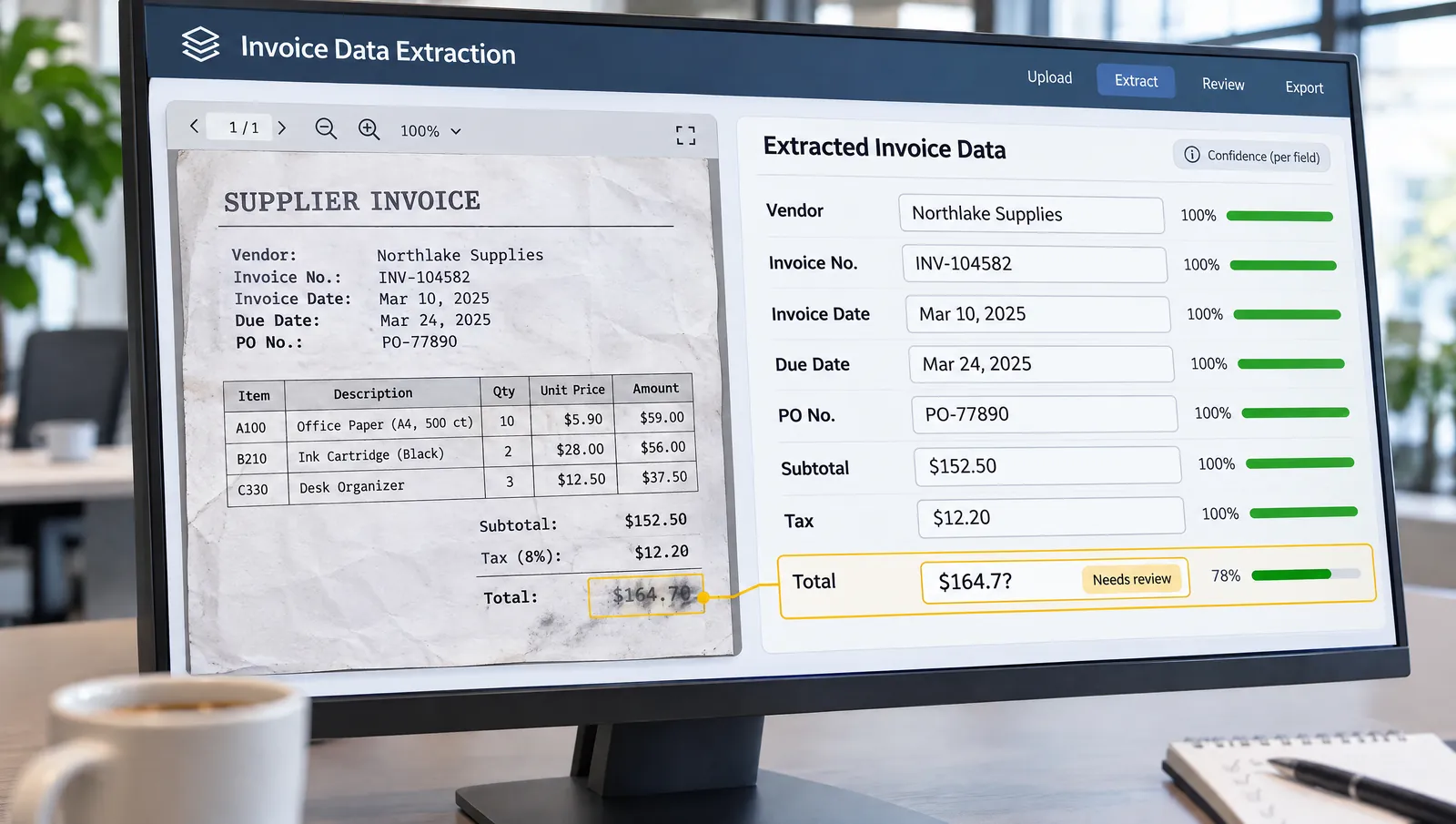
Step 3: Validate Invoice Data and Check for Duplicates
Validation compares what was extracted with facts you already hold. The vendor must exist in your vendor master. Line items must multiply and add up to the subtotal, and subtotal plus tax and freight must equal the total. Dates must be plausible, and the invoice number can’t be blank.
Duplicate invoice detection needs more care than most setups give it. Built-in checks usually compare a few fields. Xero, for instance, looks at the contact, reference and amount on bills to flag possible duplicates. That works only when the same invoice is entered the same way every time. “INV-0457” and “457,” or a supplier set up under both its legal and trading names, look like two different bills to a simple comparison. Normalize invoice numbers by stripping prefixes, spaces and leading zeros, and keep one vendor record per supplier before you rely on any duplicate check.
Watch for near-duplicates too: same vendor, same amount, close dates, different reference. These are often reminder copies, and they should be held for a person to decide rather than silently blocked or passed.
Step 4: Match Invoices Against Purchase Orders
If your business uses purchase orders, matching is where automation earns much of its value. Two-way matching compares the invoice with the PO for vendor, items, prices and quantities. Three-way matching adds the receiving record, confirming that the goods or services actually arrived.
Tolerances let small, explainable differences through, such as rounding or a freight charge the PO allows. Start them tight and widen them only when your exception history shows a pattern is safe. Invoices without a PO, such as utilities, subscriptions and professional services, have nothing to match against. They are coded from vendor history or rules, and they need an approver who understands the spend.
Step 5: Send Exceptions for Human Review
An exception is any invoice that fails a check: a low-confidence field, a math error, a price variance, an unknown vendor, a possible duplicate or a missing receipt. A useful exception queue shows the reviewer the reason, the specific field and the original document side by side, so a decision takes seconds instead of an email hunt.
This is what human-in-the-loop invoice processing means in practice. AI prepares the invoice, and a named person decides what happens to anything unusual. Record every correction. Corrections improve extraction over time, they give auditors evidence, and a rising correction rate on one vendor is an early warning that something changed.
Approval is a separate decision from exception review. Invoice approval routing sends each bill to the person accountable for the spend, usually by amount, department or vendor. Automatic approval can be reasonable for low-value, PO-matched invoices from established vendors, but it should be a deliberate rule with a dollar ceiling, not the default.

Step 6: Record Approved Invoices in Accounting Software
Once approved, the bill is created in QuickBooks, Xero, NetSuite or another system through an API or connector. Map fields carefully before go-live, including vendor IDs, GL accounts, classes or tracking categories, tax codes and attachments, and test against a sandbox or a copy of your company file first.
Integrations fail more often than teams expect. Access tokens expire, a field becomes mandatory after an update, a vendor exists in one system but not the other, or a connector times out. Two failure patterns matter most. A silent failure leaves an approved invoice unrecorded until it misses its due date. A blind retry posts the same bill twice. Every write should carry the invoice’s internal ID so the workflow can confirm the bill doesn’t already exist, and every failed sync should alert a person instead of retrying indefinitely.
A recorded bill is a liability on the books, not an instruction to pay. Payment authorization, the act of releasing funds, should belong to someone with that authority who did not also enter the invoice. QuickBooks reflects this split: bill approval and payment release approval are separate workflows, and both require QuickBooks Online Advanced or QuickBooks Bill Pay Elite. Check what your plan includes before you design controls around a feature.
Step 7: Monitor Results and Maintain Control
An automated workflow drifts even when nobody touches it. Vendors redesign invoices, new suppliers arrive, and staff loosen a rule to clear a backlog. Monitoring keeps the system honest.
Each month, pull a random sample of auto-approved invoices and check them against the source documents. Track exception reasons and correction rates by vendor. Keep an audit log of who changed a rule, threshold or approver, not just who approved invoices. And give the automation only the permissions it needs: a workflow that creates draft bills has no reason to edit vendor bank details or start payments.
A Practical AI Invoice Processing Example
This scenario is hypothetical. The company, vendors and figures are invented to show how the controls above work together.
A 60-person commercial HVAC contractor receives about 400 supplier invoices a month into one AP mailbox. On a Tuesday morning, four arrive.
The first is a $3,180 parts invoice referencing PO 7712. Every field comes back with high confidence, the math checks out, and the receiving log shows the parts were delivered. The price is $14 above the PO because of a freight line the PO allows, which is within tolerance. The rule approves it and creates a draft bill, which still waits for the controller’s weekly payment release.
The second is a scanned equipment-rental invoice. A coffee stain covers one digit, and the model reads the total as $8,450 with low confidence. The invoice lands in the exception queue with the total highlighted. The AP specialist reads $8,950 on the original, corrects it, and the invoice moves on to the operations manager for approval.
The third comes from an electrical supplier and carries invoice number 457. The same vendor already has INV-0457 on file from last week, for the same amount. Because the workflow normalizes invoice numbers, both read as 457, and the new copy is held as a probable duplicate. The specialist confirms it is a reminder copy and voids it.
The fourth is from a long-standing sheet metal vendor. The amount and PO match, but the remit-to account printed on the invoice differs from the vendor record. The workflow does not touch the vendor’s bank details and does not approve the invoice. It opens a vendor-change request, and the AP lead calls the vendor at the phone number already on file, not the one on the invoice. The vendor hasn’t changed banks. The invoice was altered inside a compromised email thread, and the team reports it.
Three of the four invoices needed a person, and that is the system working as designed. What disappeared was the typing, the inbox searching and the guessing about whether something had already been entered.
Real Business Experiences With Invoice Automation
Two published customer stories show these ideas in practice. Both are vendor-published case studies, so the results are reported by the software vendor and its customer rather than independently audited. Neither is a Parix.ai project.
Galileo Learning runs summer day camps at more than 70 locations across the United States. According to BILL’s case study, its finance team had been spending 20 to 25 hours a week writing checks and handling basic AP work, and invoices needed different approvers depending on the amount. After moving to BILL, synced with Sage Intacct, invoices were routed automatically under approval rules, questions were raised inside the invoice record, and approvals were kept in an audit trail. BILL reports that the team saved 50% of its time on AP tasks. The lesson: approvals and documentation consume as much time as data entry, so automate the routing, not just the reading.
JLab, an audio technology brand with fewer than 100 employees, had been chasing approvals through shared inboxes and uploading invoice PDFs into NetSuite by hand. Tipalti’s customer story describes a move to PO matching, a single-step approval flow connected to NetSuite, and automatic syncing of payment status back to the ERP. Tipalti reports that the team’s productivity rose 68%, it handled 35% more invoices without adding staff (from 500 to 675 a month), and month-end close fell from five or six days to four. The takeaway: much of the gain came from removing double entry between systems, not only from reading invoices faster.
What Can Go Wrong With AI Invoice Automation?
The most common failure is misplaced trust. After a few hundred clean invoices, reviewers start approving without opening the document, and that’s when a misread total or a re-sent bill slips through.
Other failures are structural. Messy vendor data produces false matches and missed duplicates. A rule written to clear one backlog stays in place and quietly widens what gets approved automatically. A connector breaks after an accounting-software update, and nobody notices until a vendor calls about a late payment.
Fraud is the sharpest risk. Business email compromise targets this exact workflow: a real vendor’s mailbox is hijacked, and an invoice or “updated payment instructions” redirect money to a criminal’s account. Nacha’s business email compromise action plan describes this pattern directly. Automation that reads remit-to details and updates vendor records without verification makes the attack easier, not harder.
How to Prevent Errors and Unauthorized Payments
The controls that matter most are easy to describe and take discipline to keep.
Separate duties. Whoever enters an invoice shouldn’t approve it, and neither person should be able to release payment alone. Small teams may not have three people for every step, but they can still require a second approver above a set dollar amount, which Nacha also recommends for higher-value transactions.
Run bank-detail changes through their own manual workflow. An invoice should never update a vendor’s payment information. Confirm every change outside the channel that requested it, using contact details you already hold, and hold payments to that vendor until the check is complete.
Put dollar limits on automatic approval and keep them in writing. Restrict who can change rules, thresholds and approvers, and log every change. Keep AI on the reading side of the process: it can extract, flag and suggest, but money should move only after a person with authority says so.

When Should a Business Automate Invoice Processing?
Automation pays off when invoice volume is steady, invoices arrive in many formats, and staff spend hours on entry and on chasing approvals. It helps most when a meaningful share of spend runs through purchase orders, because matching gives the system an objective test.
It is less useful for a business handling a few dozen invoices a month from a handful of vendors; the built-in tools in QuickBooks or Xero may be enough. It is premature when the underlying process is undefined. If nobody can say who approves what, automation only makes an unclear process faster. Clean the vendor list, write the approval policy, then automate. Parix.ai’s 30-question automation audit is a practical way to test readiness before you spend anything.
There are three broad routes. You can use the native features of your accounting software, adopt a dedicated AP platform such as BILL, Tipalti or Ramp, or build a custom workflow that connects document AI to your existing tools. Custom builds often run on a workflow engine, and our comparison of Zapier, Make and n8n explains how those platforms differ. The right choice depends on volume, how unusual your approval rules are, and how well your current systems already talk to each other.
How to Measure Invoice Automation Performance
Measure the current process for a month before changing anything, or you won’t be able to show what improved. Then track a small set of numbers the same way every month.
The touchless rate is the share of invoices that reach approval without anyone editing them. The exception rate, split by reason, tells you what to fix next. The correction rate on extracted fields shows whether AI accuracy is holding, especially vendor by vendor. Cycle time from receipt to approval, and from approval to payment, shows where delays remain. Count the duplicates and suspicious bank changes caught, along with any payment errors that got through. Finally, track sync failures and how long each took to resolve.
Resist comparing your figures with industry benchmarks you can’t reproduce. Your own trend line is the measure that matters.
Invoice Automation Readiness Checklist
Before you build or buy, confirm that:
- Invoices arrive through one controlled channel that every vendor knows about.
- Each supplier has a single vendor record, with verified and locked bank details.
- A written policy says who approves which invoices, and at what amounts.
- Approval and payment release belong to different people, or require two.
- Bank-detail changes follow a verification process outside email.
- Your accounting plan supports the roles, workflows and integrations you need.
- You have at least a month of baseline data on volume, exceptions and cycle time.
- Someone owns the exception queue and the monthly sample review.
Frequently Asked Questions
Is AI invoice processing accurate enough to trust?
On clean digital invoices, extraction is generally reliable, but no tool is right every time, and accuracy drops on scans, photos and unusual layouts. Trust comes from the controls around the AI: field-level confidence thresholds, math and duplicate checks, and human review of exceptions. Test any tool on a sample of your own hardest invoices.
What is the difference between invoice approval and payment authorization?
Approval confirms that an invoice is valid and the spend was authorized. Payment authorization releases the money. Keeping them as separate steps, ideally owned by different people, means one mistake or one compromised account can’t both accept and pay a fraudulent bill.
Can QuickBooks or Xero automate invoice processing on their own?
Both can capture bill details from uploaded or forwarded invoices, and both offer some approval and duplicate-checking features. What you get depends on the plan; in QuickBooks, bill approval workflows require QuickBooks Online Advanced or Bill Pay Elite. Businesses with complex routing, PO matching or several connected systems often add a dedicated AP tool or a custom AI integration with the accounting system.
How does automation prevent duplicate invoice payments?
It compares each new invoice with existing bills on vendor, invoice number and amount, and flags matches for review. Those checks are only as good as the data, so normalize invoice numbers and remove duplicate vendor records first. Near-duplicates with different references should be held for a person to decide.
Should vendor bank details ever be updated automatically?
No. A change to payment instructions is one of the most common fraud signals in accounts payable. Treat every change as a separate request, confirm it through a channel other than the one that sent it, using contact details already on file, and hold payments until it’s verified.
How long does it take to set up invoice automation?
It depends on volume, the number of systems involved and how clear your approval rules are. A capture-and-approve workflow on top of existing accounting software can be running within weeks, while projects with PO matching and ERP integration take longer. Cleaning vendor data and agreeing on an approval policy often take more time than configuring the software.
How much does invoice automation cost?
Costs include software or platform subscriptions, document-AI usage, implementation work and ongoing maintenance. Dedicated AP platforms usually charge by user, invoice or transaction. If you’re considering a custom build, our guide to what AI automation costs breaks down build and running costs.
Conclusion
Automated invoice processing works best when AI does what it’s good at, reading varied documents quickly, while rules and people handle everything with money attached. Build the workflow around checkpoints: field-level confidence, duplicate and math checks, PO matching, a staffed exception queue, separate approval and payment release, and a manual process for bank-detail changes. Then review the numbers every month, because a workflow nobody watches will drift.
Parix.ai has used this same review-queue approach in its own client work. In a nonprofit donation sync, unclear matches went to a person for review instead of creating duplicate donor records.
If you’d like a second pair of eyes on your AP process, Parix.ai designs approval-first workflow automation that connects document AI to the accounting software you already use. Even if you end up choosing an off-the-shelf AP platform, a clear map of your approval rules will make that decision easier.