How to Create a Custom GPT for Business: A Complete Guide
A custom GPT is a version of ChatGPT that you configure once with your own instructions, documents and tool connections, so it answers as someone who already knows your business. Creating one takes about twenty minutes, requires no code, and needs a paid ChatGPT plan.
That’s the short answer. The longer answer — the one that decides whether the thing is still being used in three months — is about what you put into it.
Most custom GPTs fail quietly. Someone builds one in an afternoon, the team tries it twice, and then everyone goes back to typing into plain ChatGPT because the custom version wasn’t noticeably better. This guide is written to avoid that outcome.
What is a custom GPT?
A custom GPT is a saved configuration of ChatGPT that combines four things: written instructions that define its role, knowledge files it can read from, tool connections called actions, and a choice of underlying model. Once saved, anyone you share it with gets the same specialised assistant without having to prompt it from scratch.
The easiest way to think about it: plain ChatGPT is a very capable graduate who starts every conversation with no memory of your company. A custom GPT is that same graduate after a proper induction — they’ve read the handbook, they know your tone of voice, and they know which system to check before answering.
What it is not: a custom GPT does not retrain the underlying model on your data. Nothing you upload changes how GPT works for anyone else. It reads your documents at the moment it needs them, the same way a person would open a file.
That distinction matters when someone in the room asks about data safety, and it’s the point most guides gloss over. If you’re weighing up how AI fits into your existing systems more broadly, our guide to AI integrations covers the wider picture.
Custom GPT vs ChatGPT Projects: which do you need?
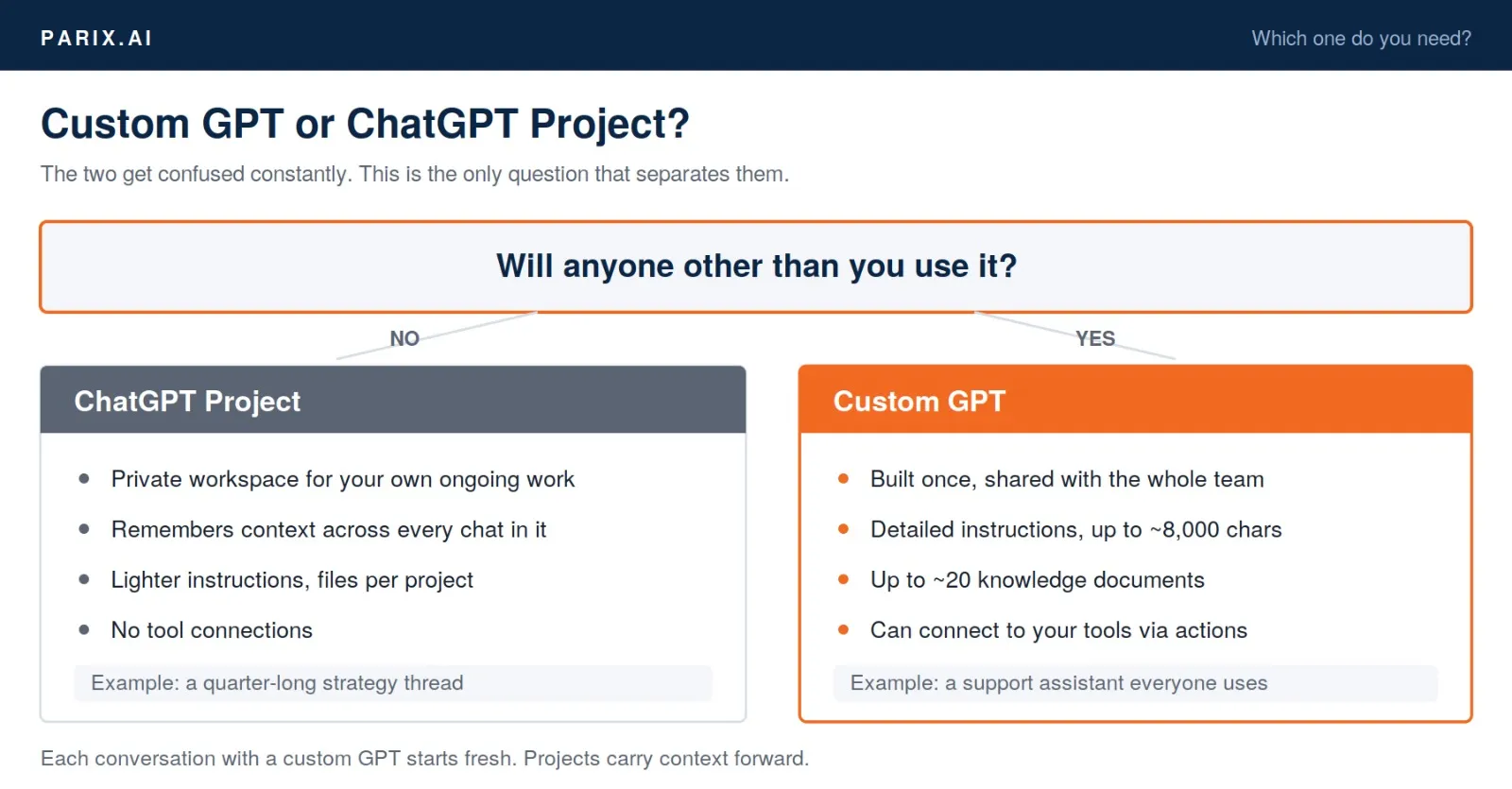
Both organise your work, but they solve different problems. Custom GPTs are built to be shared and reused by other people. Projects are private workspaces that keep related conversations and files together for one person.
| Custom GPT | ChatGPT Project | |
|---|---|---|
| Built for | Sharing with others | Your own ongoing work |
| Instructions | Detailed, up to ~8,000 characters | Shorter, lighter |
| Knowledge files | Up to ~20 documents | File uploads per project |
| Tool connections | Yes, via actions | No |
| Conversation memory | Starts fresh each chat | Carries context across chats |
| Best for | A support assistant the whole team uses | A quarter-long strategy thread |
Rule of thumb: if more than one person will use it, build a GPT. If it’s a body of work only you are handling, use a Project.
How to create a custom GPT in ChatGPT: 6 steps
Open ChatGPT, go to the GPT section and choose Create. You’ll be offered two modes: Create, where ChatGPT interviews you and builds it, and Configure, where you fill the fields yourself. Use Create for your first attempt, then switch to Configure to tighten it.
Step 1 — Pick one job, not five
The single biggest cause of a useless custom GPT is scope. “General business assistant” produces general business answers, which is what you already had.
Pick one task that someone on your team does repeatedly and would be glad to hand over. Answering the same six customer questions. Drafting proposals from a template. Turning meeting notes into tasks. One job, clearly bounded.
If you’re not sure which process to start with, our free automation idea generator produces a shortlist based on your industry and team size.
Step 2 — Write the instructions properly
This is where the work actually happens. You have a generous character allowance and most people use a fraction of it.
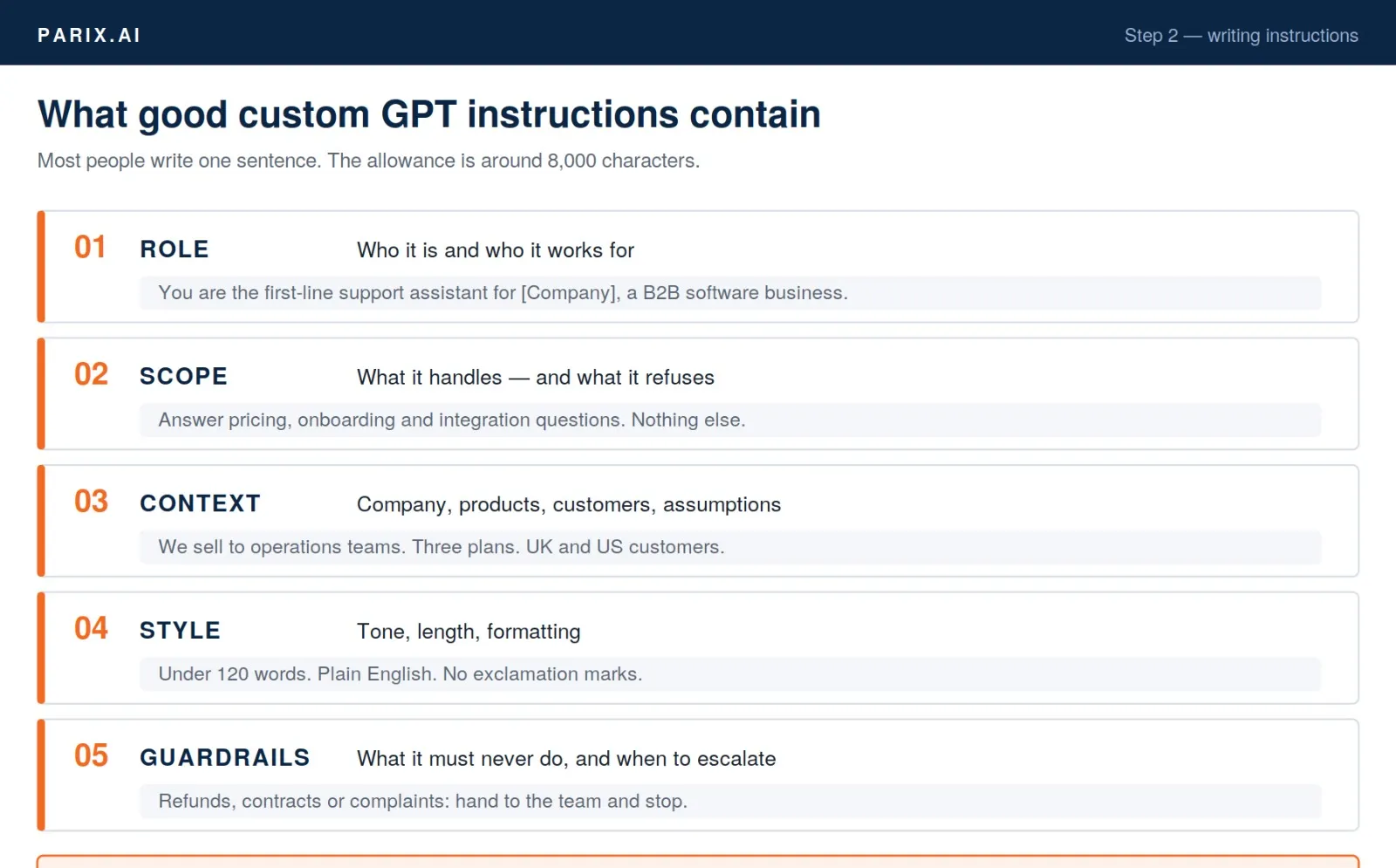
Cover five things, in this order:
- Role — who it is and who it works for
- Scope — what it handles, and what it should refuse
- Context — your company, products, customers, anything it needs to assume
- Style — tone, response length, formatting
- Guardrails — what it must never do, and when to escalate to a person
Here’s the difference in practice:
Weak: You are a helpful customer support assistant for our company.
Strong: You are the first-line support assistant for [Company], a B2B software company selling to operations teams. Answer questions about pricing, onboarding and integrations using the uploaded documents. Keep replies under 120 words, plain English, no exclamation marks. If a question involves refunds, contract terms or a complaint, do not attempt an answer — reply that you’re passing it to the team and stop.
The second one produces a usable assistant. The first produces ChatGPT with extra steps.
Writing instructions is closer to writing a brief than writing code. Our free AI prompt checker will flag what’s vague or missing before you paste them in.
Step 3 — Upload the right knowledge files
Custom GPTs can read documents you attach. This is what people mean when they talk about training a custom GPT on their own data — though as noted above, it’s reading rather than training.
What works:
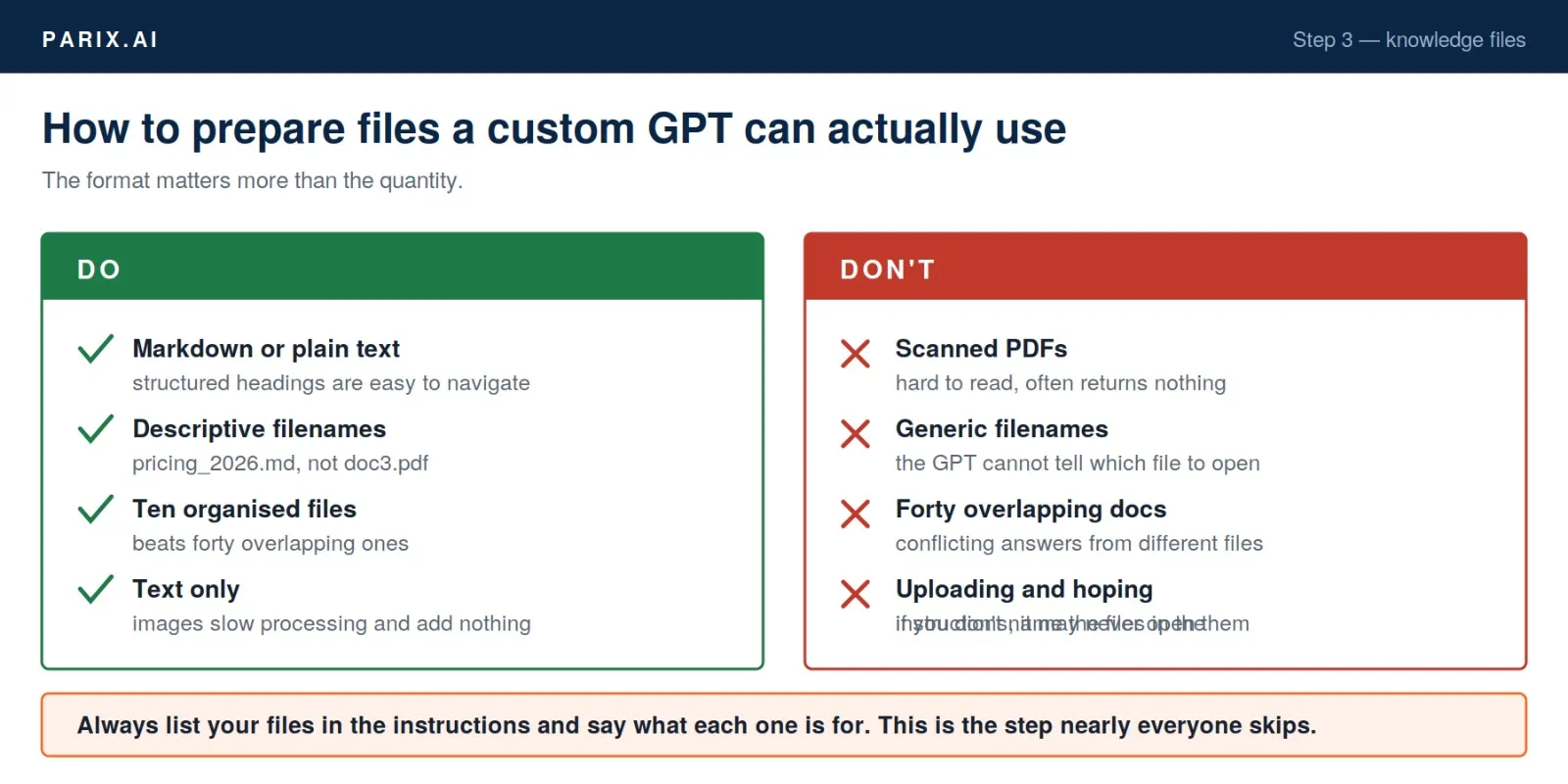
- Markdown or plain text beats PDF. Structured text with clear headings is far easier for the model to navigate.
- Descriptive filenames.
refund_policy_2026.mdnotdoc3.pdf. - Fewer, better files. Ten well-organised documents beat forty overlapping ones.
- Strip the images. They slow processing and add nothing.
Then — and this is the step nearly everyone skips — tell the GPT what each file is for inside the instructions:
You have access to these documents:
—
pricing_2026.md— use for all pricing and plan questions
—onboarding_guide.md— use for setup and getting-started questions
—integrations.md— use for questions about connecting other toolsAlways check the relevant document before answering. If the answer isn’t in them, say so rather than guessing.
Without that, the GPT treats your files as background reading it may or may not consult.
Step 4 — Add examples
Two or three sample exchanges inside the instructions teach behaviour faster than any amount of description. Show it a question and the exact reply you’d want. It will pattern-match.
If you’re building a support or sales assistant, our free chatbot script generator produces sample conversation flows you can adapt as those examples.
Step 5 — Test it like a difficult customer
Run twenty real questions through it, and make some of them awkward. Ask something the documents don’t cover. Try one that’s deliberately ambiguous. Then give it something it should refuse outright.
You’re checking three things: does it use the files, does it stay in character, and does it admit when it doesn’t know? The third is the one that breaks trust when it fails.
Step 6 — Share it
Three options: keep it private, share via link with specific people, or publish it publicly. For internal business use, link sharing is almost always right.
One thing to plan for: everyone who uses your custom GPT needs their own paid ChatGPT plan. For a team of five that’s fine. For a team of eighty it’s a budget conversation, and often the point where a website-embedded assistant makes more sense instead.
What are custom GPT actions, and when do you need them?
Actions connect a custom GPT to an external system through an API, so it can fetch live data or perform a task rather than only reading your uploaded files. This is the difference between an assistant that describes your process and one that participates in it.
Without actions, your GPT knows what you told it in November. With actions, it can check what’s true right now.
| Action | What it lets the GPT do |
|---|---|
| CRM | Look up a customer’s real account status before answering |
| Analytics | Pull this week’s traffic instead of quoting an old report |
| Helpdesk | Create or update a ticket during the conversation |
| Calendar | Check availability and book a slot |
| Internal database | Query live stock, order status or pricing |
Setting one up needs an API endpoint, an authentication method, and a schema describing what the action does. ChatGPT includes an Actions helper that will generate most of that from a plain-English description, which puts a simple integration within reach of a non-developer.
Where it stops being a DIY job is anything touching customer records, payment systems or anything with a compliance obligation attached. At that point you need someone who will think about scoped permissions and audit logs before shipping.
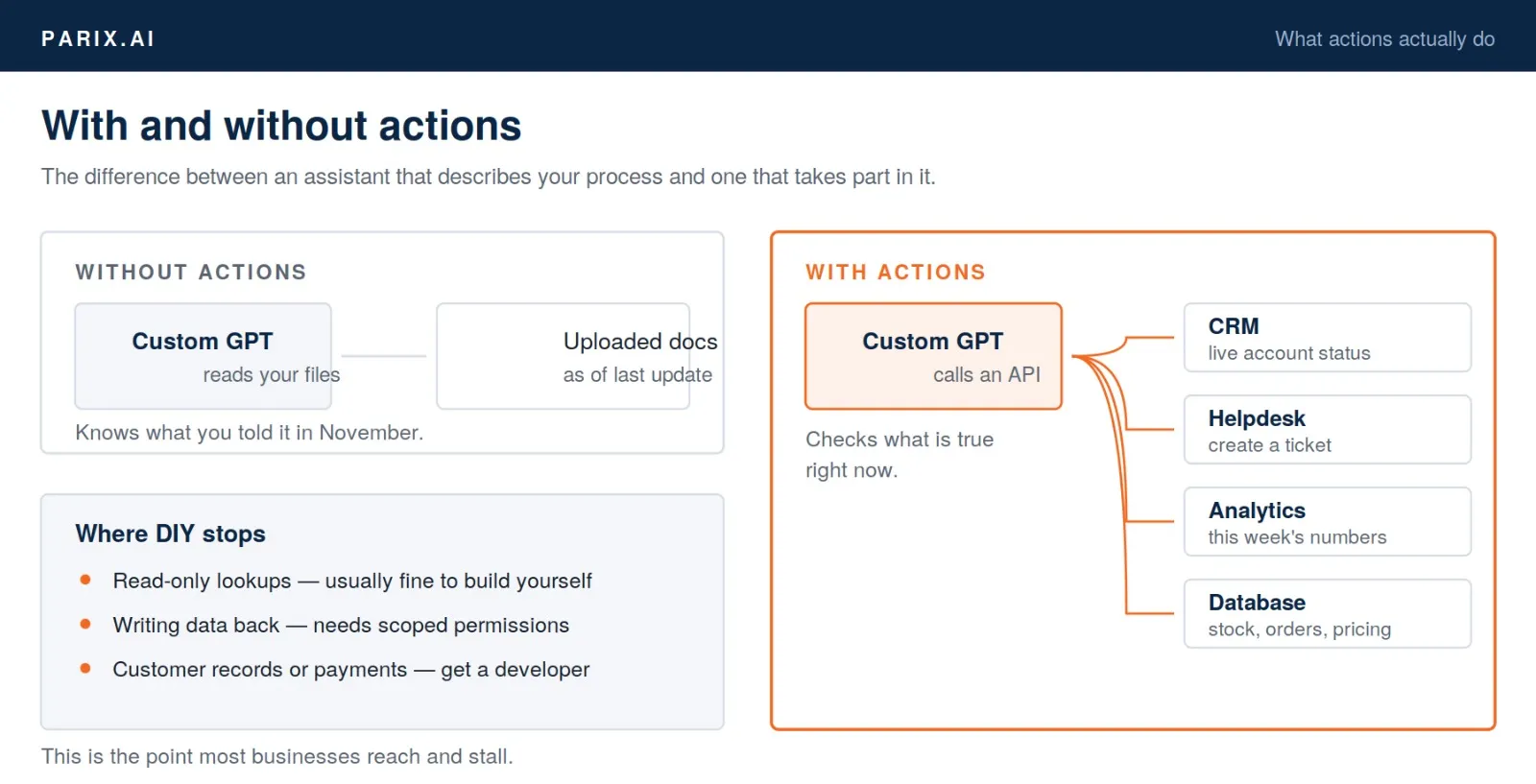
This is the point most businesses reach and stall. The GPT works, everyone likes it, and connecting it to the CRM turns out to be a different order of problem. If that’s where you are, our AI integrations service covers exactly that step — connecting a custom GPT or assistant to the systems a business already runs on, with the permissions and error handling a production tool needs. You can see how that has worked for other businesses in our case studies.
Custom GPT examples: what businesses actually build
The GPTs that survive tend to be narrow and unglamorous. Here are the patterns that come up repeatedly:
| Use case | What it does | Why it sticks |
|---|---|---|
| Support first-responder | Answers common questions from policy docs, escalates the rest | Removes a task the team openly dislikes |
| Proposal drafter | Turns a brief into a first draft using past proposals | Saves the worst hour of the sales week |
| Onboarding assistant | Answers new-starter questions from the handbook | Stops the same five questions reaching the same manager |
| Brand voice checker | Reviews copy against your style guide | Keeps output consistent across freelancers |
| Meeting-notes processor | Turns transcripts into decisions and actions | Nobody enjoys doing this manually |
| RFP screener | Reads inbound tenders and flags which are worth bidding on | Saves hours of reading to reach a no |
Notice what’s missing: nothing here is trying to replace a role. Each one removes a specific repeated task from a specific person’s week. That’s the pattern that gets defended when it breaks, rather than quietly abandoned.
Several of these overlap with tools you can use straight away without building anything — there are 43 of them in our free AI tools hub, all free with no signup.
How much does a custom GPT cost?
Building one costs nothing beyond a paid ChatGPT subscription for each person who will use it. Costs appear when you go past what the built-in builder can do.
| What you’re doing | Realistic cost |
|---|---|
| Building it yourself in ChatGPT | Subscription per user, no build cost |
| Writing proper instructions and organising documents | A day of internal time |
| Adding a simple action (read-only, one system) | Days of developer time |
| Production integration with a CRM or database | A proper project, scoped |
| Ongoing maintenance | A few hours a month — this is the one people forget |
That last row is where budgets get missed. Documents go stale, processes change, APIs update. A custom GPT that nobody maintains gives confidently wrong answers within six months, which is worse than having none.
Before committing to anything larger, our free AI automation cost calculator gives you a working estimate and payback period in a couple of minutes.
Where custom GPTs fall short
Worth knowing before you build:
- Everyone needs a paid plan. This is the constraint that catches larger teams out.
- No memory between chats. Each conversation starts fresh unless you’re using a Project.
- They can still be wrong. A custom GPT with good documents is far more accurate, but it will occasionally produce a confident answer that isn’t in any file. Keep a human reviewing anything with consequences.
- They live inside ChatGPT. If you want an assistant on your own website, in your product or inside your helpdesk, you need an API integration rather than a custom GPT — which is closer to product development than configuration.
- They need maintenance. Not much, but not zero.
None of these are reasons to avoid building one. They’re reasons to be clear about what you’re getting.
Frequently asked questions
Do I need to know how to code to build a custom GPT?
No. Instructions are written in plain English and knowledge files are uploaded through the interface. Coding only becomes relevant if you add actions that connect to external systems.
Are custom GPTs private?
Documents you upload to a private custom GPT are used to answer questions within that GPT rather than shared publicly. Business and enterprise plans carry stronger data commitments than consumer plans. As a working rule, don’t upload anything you would be uncomfortable seeing outside the company, and check current terms before uploading anything regulated.
Can I train a custom GPT on my own data?
Not in the fine-tuning sense. You give it documents it can read from, which produces business-specific answers without altering the underlying model. For most purposes the result is what people want when they ask about training.
How long does it take to build one?
A basic version takes about twenty minutes. A genuinely useful one takes a day, and most of that day goes on writing instructions and organising documents rather than on the builder itself.
Can a custom GPT connect to our CRM?
Yes, through actions — provided the CRM has an accessible API. Read-only lookups are straightforward. Anything that writes data back needs proper scoping and error handling.
Can I put a custom GPT on my website?
Not directly. Custom GPTs run inside ChatGPT. A website assistant needs an API-based integration, which is a different build with different costs.
What’s the difference between a custom GPT and a chatbot?
A traditional chatbot follows decision trees you define in advance. A custom GPT interprets what someone actually wrote and answers from your documents, so it handles phrasing you never anticipated. It’s also less predictable, which is why review matters early on.
PARIX.AI
Stuck at the integration step?
Building the GPT is the easy part. Connecting it to your CRM, helpdesk or database is where most teams stall. That is the part we build — with scoped permissions, error handling and something to fall back on when an API changes.
Where to start
Pick the single most repetitive question your team answers. Write instructions that are specific enough to be uncomfortable. Upload three well-organised documents rather than thirty messy ones. Test it with twenty real questions, including the awkward ones. Share it with two people before ten.
If it works, the next one is easier. If it doesn’t, you’ve lost an afternoon rather than a budget.
And when the useful version turns out to be the one connected to your CRM, helpdesk or database — that’s the point where a build stops being a configuration exercise. We do that work at Parix.ai; our custom ChatGPT integration services cover connecting AI assistants to the systems a business already runs on. More on how we approach automation is on our blog.