
No-Code AI Automation: Build Powerful Workflows Without Coding (2026 Guide)
Not long ago, automating your work meant one of two things: hire a developer, or sit down and learn to code yourself. Neither was cheap or quick. That’s changed. No-code AI automation lets pretty much anyone build workflows that run on their own. You drag visual blocks, connect them, and let AI handle the thinking part. No code. No developer.
In this guide we’ll walk through what no-code automation really is, why no-code workflow automation blew up in 2026, which tools are worth your time, real workflow automation examples you can copy today, and how to build your very first one step by step. You don’t need any tech background. If you can describe a task, you can automate it.
What Is No-Code AI Automation?
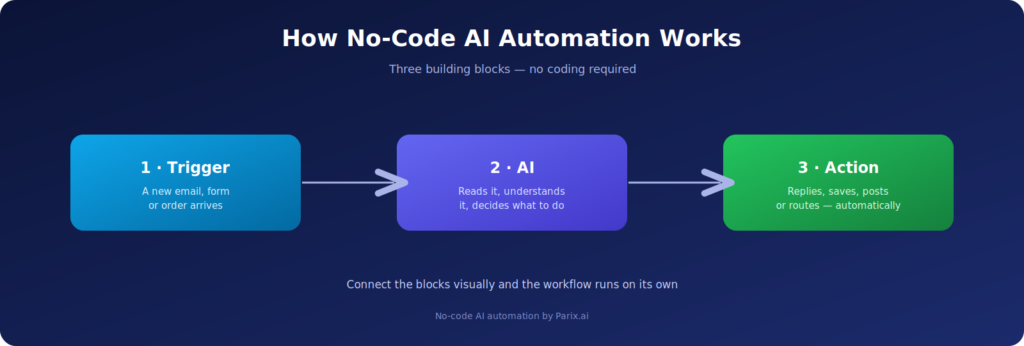
So, what is no-code automation, in plain words? It’s two things working together: visual tools that need zero coding, and AI that does the smart part. You’re not programming anything. You just line up the steps, connect your apps, and hit go. Here’s a quick picture of it: an email lands in your inbox, AI reads it, sums it up, and writes a draft reply, all before you’ve even seen it.
The big change here is who gets to do this. No-code workflow automation used to belong to developers only. Not anymore. That same accessibility is what makes professional workflow automation so powerful, and no-code tools hand a lighter version of it straight to the people actually doing the work.
Why It Matters in 2026
Everyone’s being asked to do more with less. And the pile of digital busywork, emails, customer questions, content, data entry, has grown way past what any person can handle by hand. No-code automation is the pressure valve. It quietly takes the boring, repetitive stuff off your plate so your hours go to the work that actually needs a human brain.
And not doing it costs you. Manual, repetitive work eats hours, sneaks in errors, and quietly caps how much a small team can take on, something we broke down in our piece on the hidden cost of manual workflows. No-code AI automation is one of the cheapest, fastest ways to win that time back.
How No-Code Automation Works
Strip it down and almost every workflow is just two pieces: a trigger and an action. The trigger is what kicks it off, a new email, a form submission, a fresh order. The action is what happens next, a reply gets sent, a record gets saved, an update gets posted. Wire those two together and congratulations, you’ve automated a task.
AI is the third piece, and it’s the one that makes things interesting. A plain automation spits out the same canned response every time. An AI step actually reads the input, gets what it means, and produces something tailored, a personal reply, a summary, a quick analysis. That’s what AI integration adds, and it’s the line between 2026’s automation and the stiff rule-based kind we all put up with before.
The Best No-Code Automation Tools and Platforms in 2026
The no-code automation platform you pick really does matter. A few stand out this year, and each one fits a different kind of person.
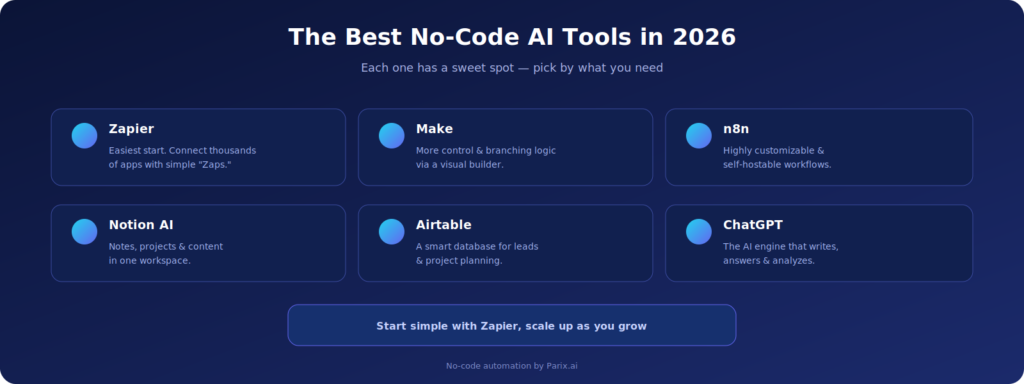
Most people start with Zapier. It connects thousands of apps through little automations called “Zaps,” and the interface is friendly enough that a total beginner can build something useful in an afternoon. Fair warning though, the free plan runs out fast once you get hooked.
When you outgrow that, Make (used to be Integromat) is the natural next stop. Its visual builder handles messier, branching logic that Zapier struggles with, and it’s usually cheaper per operation too, so a lot of people graduate to it once their automations get serious.
After those two, a few more no-code automation software picks round out a solid stack. n8n if you want full control and the option to self-host. Notion AI for notes, projects, and writing. Airtable as a smart database for things like leads and project planning. And ChatGPT as the AI brain that writes, answers, and processes text inside your workflows.
Real Workflow Automation Examples You Can Copy
This all clicks the moment you see it in action. Every one of these AI automation examples is doable with no-code tools, and none of them need a single line of code:
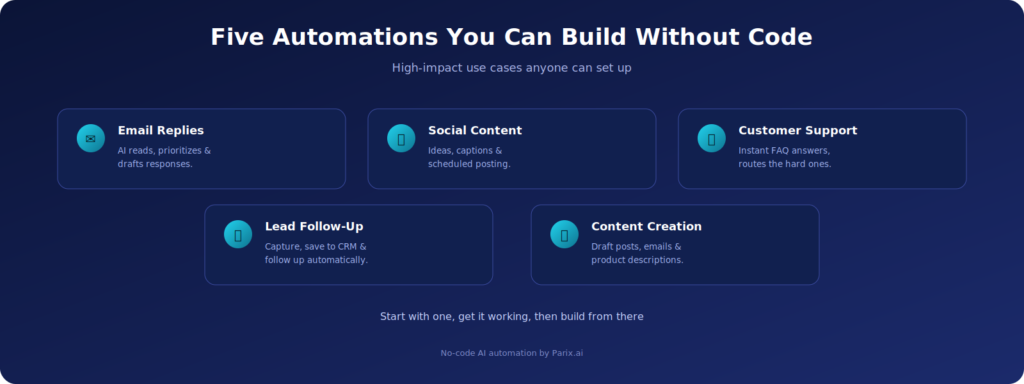
- Email reply automation: AI reads, sorts by priority, and drafts replies so your inbox stops bossing your whole day around.
- Social media content: spin up post ideas, write captions, and schedule the lot on autopilot.
- Customer support: an AI chatbot handles the FAQs instantly and passes the tricky ones to a real human.
- Lead generation and follow-up: grab leads from forms, drop them into your CRM, and fire off personalized follow-ups so none slip through the cracks.
- Content creation: AI drafts blog posts, emails, or product descriptions and files them right where you need them.
And these workflow automation examples aren’t theory. Automating repetitive e-commerce tasks handed one team back hours every single week, which we covered in our e-commerce operations automation case study. The same play works whether you’re a one-person shop, a startup, or a busy online store.
If you’re not sure where to begin, start with leads. Slow follow-up quietly loses sales, and that’s usually where automation pays for itself fastest. Pair it with analytics, the way we lay out in our guide to AI customer insights platforms, and the system can react to what a customer does the second they do it.
How to Build Your First No-Code Workflow
Getting started is easier than it looks. The trick is to start tiny and grow, not to automate your whole life on day one. Here’s the path almost everyone takes:
- Pick one repetitive task. Something you do again and again, like replying to the same email, posting updates, or updating a sheet.
- Pick a tool. Begin with Zapier while you find your feet, then move to Make when you need more muscle.
- Set the trigger and action. Decide what starts it and what should happen. Example: a new form submission fires off an automatic reply.
- Add AI. Let it write the reply, summarize the input, or crunch the data so the result feels tailored instead of generic.
- Test and tweak. Run it, check the output’s actually right, and tune it until it’s reliable before you start trusting it.
Challenges to Watch For
No-code automation is powerful, but it’s not magic, and knowing the rough edges saves you headaches later. First, tool limits: some platforms choke on really advanced logic, so now and then you’ll have to combine tools or pay for an upgrade. Second, AI reliability: models sometimes get things wrong or go off-topic, so keep a human eye on anything that matters. Third, data security: the moment you connect tools, you’re moving data around, so be careful what flows where. None of these are dealbreakers. They’re just reasons to build with a bit of thought.
The Future: From Automation to AI Agents
The next jump is already happening, and it’s a big one, from simple automations to AI agent workflow automation. A basic workflow walks a fixed trigger-and-action path. An AI agent can take a whole multi-step job and run it on its own, making calls along the way with barely any input from you. Gartner predicts 40% of enterprise apps will have task-specific AI agents by 2026, up from under 5% in 2025. That’s a fast curve.
On top of that, tools keep connecting more smoothly, and businesses are starting to use automation not just to do tasks but to suggest decisions based on their own data. Want to go deeper on where agentic automation is heading? Our guide on AI-powered workflow automation picks up right there. Learning the no-code basics now is your on-ramp to all of it.
How Parix.ai Can Help
If all of this sounds great but you’d rather not figure it out alone, that’s where we come in. At Parix.ai, we design and build no-code AI automation around how your business actually works, not a generic template. We map out where your time is leaking, pick the right tools for the job, and wire up workflows that handle the repetitive stuff for you, from workflow automation to deeper AI integrations that plug intelligence straight into your day-to-day. We’ve done it for real teams too, like the e-commerce operation we helped claw back hours every week in this case study. Whether you want a single automation to start or a full system built end to end, we’ll take it from idea to up-and-running.
Conclusion
No-code AI automation quietly rewrote the rule about who gets to build powerful workflows. The answer now? Everyone. Pick one repetitive task, get it running, then build out from there until a real chunk of your routine handles itself. Want it designed and built around your exact business instead of doing it solo? Get in touch with Parix.ai. And if you’re going it alone, there’s honestly no better day to start than today.
FAQs
What is no-code AI automation?
It’s building automated workflows with visual, drag-and-connect tools, no coding needed, and layering AI on top to handle the smart stuff like writing replies, summarizing, or analyzing data.
What are some no-code workflow automation examples?
A few common ones: auto-drafting email replies, scheduling social posts, running an AI chatbot for support, capturing and following up on leads, and generating content. All built without code.
Is no-code AI workflow automation good for small business?
Honestly, it’s one of the best fits there is. It skips the cost of hiring a developer, sets up in minutes, and most platforms have free tiers, so you can automate the boring work without a big budget or a tech team.
Do I need any technical skills to use it?
Nope. These tools are made for non-technical people. If you can explain what you want to happen, you can usually build it just by connecting blocks.
What’s the best no-code automation platform to start with?
Zapier is the gentlest on-ramp, simple interface, huge app library. Once your workflows get complicated, Make gives you more control and proper branching logic.
What’s the difference between an automation and an AI agent?
A standard automation follows a fixed trigger-and-action path. An AI agent takes a whole multi-step job and runs it itself, making decisions as it goes, with barely any input from you. Agents are the next stage of no-code automation.
Is no-code AI automation safe for business data?
It can be, as long as you’re careful. You’re connecting tools and passing data between them, so stick to reputable platforms, control exactly what flows where, and keep a human watching the sensitive workflows.